I was recently conversing with a client who was unable to purchase a complete set of books on Amazon.com. He was extremely frustrated that the website would only suggest one book at a time, when he knew that they should be sold as a set. He eventually abandoned his session on Amazon and purchased the set elsewhere online. The injection of a live chat system may have saved the sale in this example; it may also have prevented my client from sharing this negative experience with me.
Kuno Creative published an entire article dedicated to when angry online shoppers turn to social media to vent their brand-frustrations.
To e-tailers selling is becoming less about driving lots of traffic to your website or online store and more about helping prospects buy. Many websites suffer from the “high-traffic, low-conversion conundrum” according to Fast Pivot , who gives the example of woman running a Yahoo! Store. She had only had two sales after ten thousand website visits.
Low conversion in online commerce is compounded by market saturation in a sector. Consider just how many e-commerce sites are selling shoes to women. The road to profitability for online or e-commerce businesses continues to become longer and longer. This article makes a case for implementing live chat systems as a pathway to an increased amount of onsite conversions.
A Brief Introduction to Live Chat
Live chat support is a powerful tool to initiate online communication between a brand and a consumer in real time or similarly during business to business communications online. Once the chat session has begun, a visitor can interact with a customer service representative or salesperson via text messages on the screen. The purpose is to have the brand or business address any questions or concerns of the consumer.
According to a recent survey by eDigital Research, consumers were more satisfied with live chat as a means for customer service than any other channel, including email, phone or social media. The response of these consumers suggests that they are familiar with live chat systems and that many online businesses use live chat support to connect with their customers and respond to their queries. The study suggests that consumer expectations are changing. They are no longer satisfied with intricate automated answering systems and delays when they pick up the phone. Furhermore, they expect answers to email queries quickly with less than a quarter willing to wait 24 hours for a reply from a brand. Social media is seen as an avenue for complaining more than a source for solving their problems
Live chat support systems do an excellent job of allowing you to respond to customer queries in real-time while addressing potential customer concerns before they are spread all over the internet. The Amazon example is tame when compared to the unforgiving customer criticism that we’re all familiar with.
Key Benefits of Live Chat for Businesses
While averting poor customer experiences and subsequently some bad press is important for your brand’s reputation, there are many additional benefits to live chatsystems for businesses. A survey conducted by Forrester Research reveals
“Around 44% of online consumers say that having questions answered by a live person while in the middle of an online purchase is one of the most important features a Web site can offer.”
LIVE CHAT SAVES MONEY – Companies that use live chat have seen an overall reduction in the cost of serving customers. Such solutions are quick to implement and a lot cheaper than other customer service alternatives like phone or email support. The interaction time is reduced as well. “Consumers are quite familiar with live chat software … those that use the Web-based functionality… are more likely to buy and less likely to abandon their sessions.”
According to the International Customer Management Institute, live chat systems save the customer time and the company money. The cost savings come from many angles.
First, the amount of customer enquiries directed at a call center are reduced with live chat systems. If these systems are managed correctly they could effectively replace an entire call center which equates to huge cost savings. With more money in your company’s pockets you’ll have a larger budget to invest in really understanding your customers.
LIVE CHAT LETS YOU LISTEN TO CUSTOMERS – In order to sell more of your products or services, it’s crucial to listen to your customers. A live chat support system makes understanding customers’ concerns and needs easier because you’ll have a written log of what is causing customer headaches that can be mined for data. The more you know about your customers, the better you’ll be able to offer them solutions.
LIVE CHAT INCREASES CONVERSIONS – By this stage you’ve saved money and you increased your understanding of what your customers want. It’s time to start converting these customers.
According to an article on Sitepoint, the top ten reasons buyers abandon their online shopping sessions are often related to confusion and complications at checkout. Confused customers may have a question that they want answered in real time. Live chat support fulfills this need of addressing questions or concerns during the sales process, thereby increasing conversions or sales.
A recent Website Magazine article discussed this benefit, saying “Consumers are quite familiar with live chat software (just under two-thirds of U.S. shoppers have used live chat — a 15 percent rise from 2009). What’s more, those that use the Web-based functionality — be it on a retail or service site — are more likely to buy and less likely to abandon their sessions. It’s also a whole heckuva lot cheaper than running a call center.” Case and point for saving money and increasing conversions.
Some Things to Keep in Mind
Live chat systems aren’t perfect but they’re effective. With all the stats listed above, a case for live chat can clearly be made, however nothing can replace a true one-to-one human experience. One of the downsides to any text message experience, whether in live chat or using a mobile device, is the possibility of miscommunication. Without tone of voice or body language, live chat may have difficulty addressing a person’s concern if the text communication isn’t completely clear.
With the recent increase in live chat praise, it isn’t surprising that companies are already improving the ways that these systems operate to help fill the communication gap.
According to a recent press release by iPerceptions, “Live assistance systems can be significantly enhanced by recognizing the intent of individual visitors and initiating chat sessions with distressed buyers or other identified user groups. This greatly increases the effectiveness and return on investment made in live assistance systems.”
This company has recently created an engine to detect onsite user intent. In the case of live chat, this engine can be used to identify the right moment to inject live chat support. Live chat systems will never replace a live customer experience but they can be enhanced to become more effective, more intelligent and more efficient.
So, when is your business adopting a live support system? Please feel free to leave a comment below.
About the Author
Jenix is a journalist who specializes in discovering and documenting digital media. She makes a living as a copy writer specializing in web content and recently began writing for her personal blog: Jenix Writes. Jenix is also a proud new mother and when she isn’t writing she’s sharing in the daily discovery of her beautiful daughter. Reach out @JenixHastings


Turn Those Recorded Webinars into Kick-Ass Lead-Generating Content [AUDIO]
Lead GenerationAn article in the Gardian says, “Brands need to think like publishers to build effective content marketing work flows and outcomes including applying the science of accepted newsroom practices.” For an overworked, understaffed marketing department, this is a daunting thought.
This audio program will show you how to turn up the frequency and quality of your content output, with a minimum of time and resources. In this presentation, we’ll introduce you to the content cascade.

Podcast: Play in new window | Download
Subscribe to the Podcast
Links from Podcast
Slides
If you enjoyed this, please leave a review on iTunes!
How often are people publishing content?
Almost 70% of 100 online marketers surveyed are releasing content at least weekly. Blogs are important, too. Almost 56% are updating their blogs at least weekly.
There’s only one reliable indicator across industries for increasing the traffic to your site and that is the frequency of your blog posts. The more frequently you publish, the more your traffic will grow and the faster it will grow.
What is a content cascade?
A webinar represents a point in time in which a subject matter expert has organized a topic relevant to your business. The main points, graphs, and data have been assembled and organized. This is the hard work of content marketing.
The content cascade uses inexpensive and free tools to turn the graphics and the audio into sharable content of different types. The subject matter expert has done all the work. They’ve prepared the material, you now can create eBooks, infographs, white papers, blog posts, and reports.
That is what we call the content cascade. Listen to my webinar in its entirety to find out how you can turn those webinars sitting in your resource tabs collecting dust, into kick-ass content that converts.
Links to Resources Mentioned
Hublished for Webinar Management
Camtasia Studio for recording audio and slides
Transcribe Me and SpeechPad for transcriptions
PowerPoint for graphic design
BoxShot and BoxShot3D for Product images
Infogr.am for Infographics
Audacity for editing audio
BluBrry Podcast Hosting
Hootsuite Pro social media
Twitterfeed social feed
ClicktoTweet social sharing
Slideshare for presentations
Embed Code Generator for WordPress
Unbounce, Lander and LeadPages for landing pages.
Can Live Chat Increase Conversions?
Ecommerce CROI was recently conversing with a client who was unable to purchase a complete set of books on Amazon.com. He was extremely frustrated that the website would only suggest one book at a time, when he knew that they should be sold as a set. He eventually abandoned his session on Amazon and purchased the set elsewhere online. The injection of a live chat system may have saved the sale in this example; it may also have prevented my client from sharing this negative experience with me.
Kuno Creative published an entire article dedicated to when angry online shoppers turn to social media to vent their brand-frustrations.
To e-tailers selling is becoming less about driving lots of traffic to your website or online store and more about helping prospects buy. Many websites suffer from the “high-traffic, low-conversion conundrum” according to Fast Pivot , who gives the example of woman running a Yahoo! Store. She had only had two sales after ten thousand website visits.
Low conversion in online commerce is compounded by market saturation in a sector. Consider just how many e-commerce sites are selling shoes to women. The road to profitability for online or e-commerce businesses continues to become longer and longer. This article makes a case for implementing live chat systems as a pathway to an increased amount of onsite conversions.
A Brief Introduction to Live Chat
Live chat support is a powerful tool to initiate online communication between a brand and a consumer in real time or similarly during business to business communications online. Once the chat session has begun, a visitor can interact with a customer service representative or salesperson via text messages on the screen. The purpose is to have the brand or business address any questions or concerns of the consumer.
According to a recent survey by eDigital Research, consumers were more satisfied with live chat as a means for customer service than any other channel, including email, phone or social media. The response of these consumers suggests that they are familiar with live chat systems and that many online businesses use live chat support to connect with their customers and respond to their queries. The study suggests that consumer expectations are changing. They are no longer satisfied with intricate automated answering systems and delays when they pick up the phone. Furhermore, they expect answers to email queries quickly with less than a quarter willing to wait 24 hours for a reply from a brand. Social media is seen as an avenue for complaining more than a source for solving their problems
Live chat support systems do an excellent job of allowing you to respond to customer queries in real-time while addressing potential customer concerns before they are spread all over the internet. The Amazon example is tame when compared to the unforgiving customer criticism that we’re all familiar with.
Key Benefits of Live Chat for Businesses
While averting poor customer experiences and subsequently some bad press is important for your brand’s reputation, there are many additional benefits to live chatsystems for businesses. A survey conducted by Forrester Research reveals
“Around 44% of online consumers say that having questions answered by a live person while in the middle of an online purchase is one of the most important features a Web site can offer.”
LIVE CHAT SAVES MONEY – Companies that use live chat have seen an overall reduction in the cost of serving customers. Such solutions are quick to implement and a lot cheaper than other customer service alternatives like phone or email support. The interaction time is reduced as well. “Consumers are quite familiar with live chat software … those that use the Web-based functionality… are more likely to buy and less likely to abandon their sessions.”
According to the International Customer Management Institute, live chat systems save the customer time and the company money. The cost savings come from many angles.
First, the amount of customer enquiries directed at a call center are reduced with live chat systems. If these systems are managed correctly they could effectively replace an entire call center which equates to huge cost savings. With more money in your company’s pockets you’ll have a larger budget to invest in really understanding your customers.
LIVE CHAT LETS YOU LISTEN TO CUSTOMERS – In order to sell more of your products or services, it’s crucial to listen to your customers. A live chat support system makes understanding customers’ concerns and needs easier because you’ll have a written log of what is causing customer headaches that can be mined for data. The more you know about your customers, the better you’ll be able to offer them solutions.
LIVE CHAT INCREASES CONVERSIONS – By this stage you’ve saved money and you increased your understanding of what your customers want. It’s time to start converting these customers.
According to an article on Sitepoint, the top ten reasons buyers abandon their online shopping sessions are often related to confusion and complications at checkout. Confused customers may have a question that they want answered in real time. Live chat support fulfills this need of addressing questions or concerns during the sales process, thereby increasing conversions or sales.
A recent Website Magazine article discussed this benefit, saying “Consumers are quite familiar with live chat software (just under two-thirds of U.S. shoppers have used live chat — a 15 percent rise from 2009). What’s more, those that use the Web-based functionality — be it on a retail or service site — are more likely to buy and less likely to abandon their sessions. It’s also a whole heckuva lot cheaper than running a call center.” Case and point for saving money and increasing conversions.
Some Things to Keep in Mind
Live chat systems aren’t perfect but they’re effective. With all the stats listed above, a case for live chat can clearly be made, however nothing can replace a true one-to-one human experience. One of the downsides to any text message experience, whether in live chat or using a mobile device, is the possibility of miscommunication. Without tone of voice or body language, live chat may have difficulty addressing a person’s concern if the text communication isn’t completely clear.
With the recent increase in live chat praise, it isn’t surprising that companies are already improving the ways that these systems operate to help fill the communication gap.
According to a recent press release by iPerceptions, “Live assistance systems can be significantly enhanced by recognizing the intent of individual visitors and initiating chat sessions with distressed buyers or other identified user groups. This greatly increases the effectiveness and return on investment made in live assistance systems.”
This company has recently created an engine to detect onsite user intent. In the case of live chat, this engine can be used to identify the right moment to inject live chat support. Live chat systems will never replace a live customer experience but they can be enhanced to become more effective, more intelligent and more efficient.
So, when is your business adopting a live support system? Please feel free to leave a comment below.
About the Author
Jenix is a journalist who specializes in discovering and documenting digital media. She makes a living as a copy writer specializing in web content and recently began writing for her personal blog: Jenix Writes. Jenix is also a proud new mother and when she isn’t writing she’s sharing in the daily discovery of her beautiful daughter. Reach out @JenixHastings
It's Not Too Late for Ecommerce Businesses
Ecommerce CROLet me tap you on the shoulder and tell you that another year has passed. I tell you this because it is I have a way for you to get the growth in ecommerce sales your planning for this year.
What strategies are you using to grow in the new year?
May we suggest hedging your bets by adding Conversion Optimization to your strategy. This is a reliable way to add 5%, 10% or more to your bottom-line ecommerce revenue growth. But it takes a little time.
Call Conversion Sciences for a consultation at (888) 961-6604 and ask about our 180-day Conversion Catalyst program. It’s a complete turnkey solution. We do all the planning, development, and creative for you.
It could be the most effortless way to hit your year-over-year goals.
Call us at (888) 961-6604 or fill out a simple form to schedule a call.
It’s not to late to make sure you’ll hit your growth goals in the coming year.
PS: If you’d like to understand how much ecommerce revenue small changes in conversion rate will deliver this year, try out our Converion Optimization Upside Calculator.
Conversation Analytics Data From Calls Analyzed [INFOGRAPHIC]
Lead GenerationCall tracking is what happens BEFORE the call. Conversation Analytics is what happens ON the call.
The Convirza (formerly LogMyCalls) Conversation Analytics uses sophisticated speech recognition technology and hundreds of thousands of proprietary algorithms to extract data from phone calls. McKay Allen shared the results from those Conversation Analytics in this incredible infographic.
Some interesting takeaways:
Millions of calls are being processed by LogMyCalls. This infographic provides high level data about all of the calls analyzed in Q1. Enjoy and share!
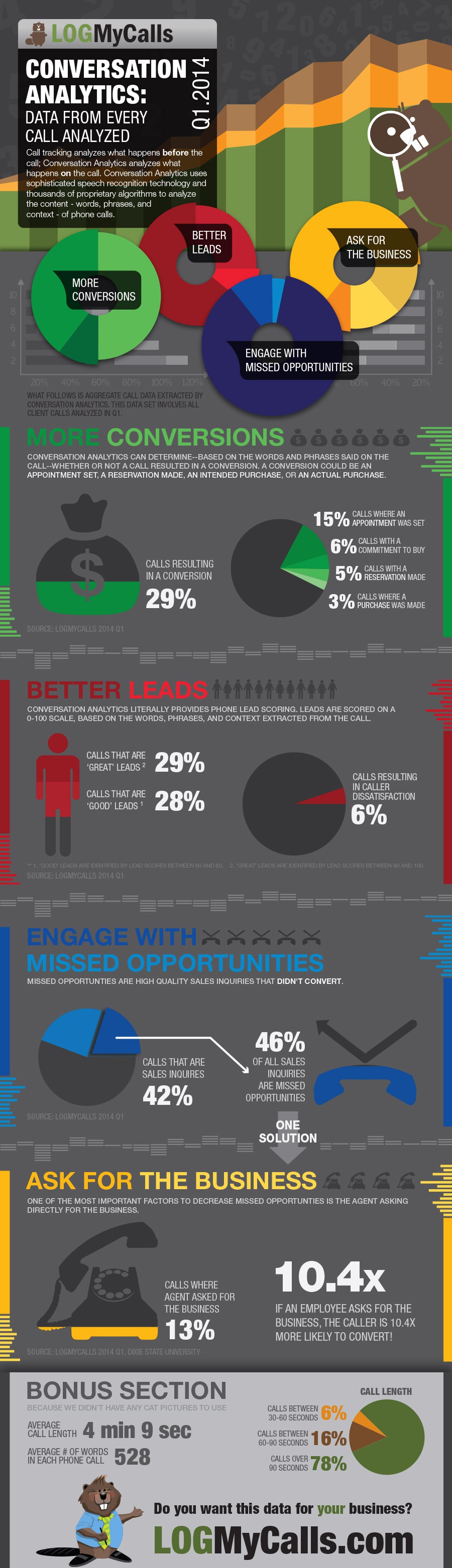
Conversation Analytics: Data from Every Call Analyzed in Q1
Here’s a webinar that shows you how to get quality phone calls with our webinar.
It’s All About You: The Future of High Quality Link-building
Web AnalyticsGoogle keeps messing with us. As soon as we thought we had Panda down, they introduced Penguin. Frankly, we weren’t too excited about the learning curve on that one. Then they threw an invisibility cloak over keywords used in Google searches, which made it even harder to figure out how people were finding us.

Both experts and high-growth firms agree that SEO is the most effective online marketing tactic for generating online leads. And now, Google is enhancing their search capability so that businesses and prospective customers can find each other faster.And now we’ve got Hummingbird to deal with.
Introduced on September 26, 2013, Hummingbird is Google’s revamped search algorithm designed to increase the organic nature of Google searches, reward websites that deliver useful content and let us search for stuff with phrases we might use when talking to a friend. Or to a mobile phone. (Where can I get gluten-free pizza around here? Gimme the stats on the final game in the 2002 World Series.)
If your IT guy or gal is adept at second-guessing Google algorithms and tricking Google into finding you, Hummingbird might not be a welcome upgrade.
But if you’ve been posting useful, keyword-rich content on your website, cultivating high quality link-building and participating on social platforms in a thoughtful way, you’re in luck. By complying with basic SEO strategies, you will find that Google is trying to help businesses like yours come out ahead.
The company you keep
In this new, more organic type of search, Google is inserting itself into (and making judgments about) your website’s online relationships.
It used to be that you could pay, trade or beg anyone to link to you, thereby improving your page rank. The more links the better, even if the originating sites were questionable or you had hired a troll to sit in a backroom and post comments (and your link) on a thousand blogs.
Google didn’t like that. With the introduction of “no follow links” and the ability to better identify “spammy” sources, spraying links throughout the Internet not only stopped working, it started costing you. Page rankings got spanked when search engines identified link-backs as originating from unsavory sites, unrelated content or artificially populated social platforms.
Roll forward to 2014. Today, high quality link-building is even more dependent upon good content. Relevance is key. The bloggers, articles, websites and publications that are linking back to you should somehow relate to the services you provide. And they should be coming from industry sources you’d be proud to hang out with.
So how do you inspire these like-minded folks to send their followers to you?
Getting your links out there
The first step in developing your high quality link-building strategy is to find out what types of people and online sources would be most appropriate for—and interested in—linking back to you. You may already know who they are, but if you need help, check out Open Site Explorer. This free tool enables you to see who’s linking to your competitors. Most likely, you will want these folks (or people like them) linking to you as well.
Next, create well-crafted content which provides information, tools and thought-leadership that will appeal to the people you want linking back to you.
And finally, raise a ruckus about it.
Make sure that influential bloggers, industry-specific publications, social sites and prospective customers are alerted to and have easy access to your e-books, webcasts, slideshows, blogs and of course, your interactive, easy-to-navigate website.
In short, establish yourself online as a foremost authority in your field.
The voice of authority
By establishing yourself as a “go-to” industry expert, your leadership position will be noted by your peers and prospective customers, and ultimately by search engines that will reward your credibility by boosting your page rank.
Here are three areas to focus on to help you increase your website’s authority:
Write, present and talk online about topics related to your field. Your industry colleagues will hesitate to direct their valued followers to your website just to promote your business. It’s critical that you provide a continuous stream of information and tools that elevate your site to the status of valued industry resource. Develop e-books, articles, webcasts, slideshows and other collateral that provide people with knowledge they might not otherwise have access to. (At Hinge, we often begin our relationships with prospective clients when they read one of our e-books on a plane or in the tub!)
Pitch your content to relevant publications and be sure to include a “resource box” that contains your bio and website link. Target online media outlets that your customers rely on for information.
Start a blog. (And don’t forget the part about actually writing in it—at least once a week.) Make sure each entry is a quick, easy read that provides useful, keyword-rich content. Encourage your readers to share it. Build relationships with other bloggers in your industry by directing them to your blog, inviting them to post and guest-posting on theirs.
Populate select social media channels with links to your cool stuff. When people “like” your content, retweet your tweets and otherwise direct their friends, fans and followers to your site, Google recognizes this as a vote of confidence and favors you in their searches. Although it takes awhile to create a strategic presence on social media platforms, it’s one of the best ways to boost your high quality link-building campaign.
These ideas should help get you started. And don’t forget—relevance is key. Be wary of aggressively seeking link-backs at the risk of compromising the quality of your connections. What search engines are aiming for in 2014 and beyond is to create authentic relationship between those who are seeking and those who have something to offer. Be patient. Like any good relationship, it takes time to build.
Sylvia Montgomery is a Senior Partner at Hinge, a marketing and branding firm for professional services. At Hinge, Sylvia provides strategic counsel to national clients. She is a co-author of Inside the Buyer’s Brain and Online Marketing for Professional Services. You can follow Sylvia on Twitter @BrandStrong.
A New Kind of Marketing Battery: Google's New Smart Lists
Web AnalyticsMarketing Batteries: These are powerful online devices that can actually store attention. Marketing batteries get charged up on the attention that you pay for by running ads, by investing in SEO, by doing press releases, by blogging, by creating webinars.
Google defines remarketing as “a feature that lets you reach people who have previously visited your site, and show them relevant ads across the web or when they search on Google.”All you have to do is tap into them after they are charged.
Customer Batteries contain the energy of those who bought from you.
Subscriber Batteries contain then energy of those who have subscribed to your lists.
Then there are Social Batteries, that store the energy of those who have like, followed, connected, plussed or pinned you. These batteries are easy to charge, but hard to get a current out of.
There has always been a gap between reliable Subscriber Batteries and skittish Social Batteries. Until now.
You can now build and charge a Visitor Battery. This is done using a technique called “Remarketing” or “Retargeting.”
Google (and other ad networks) can keep track of those who have visited your site, but didn’t buy, subscribe, or like you. When a visitor comes to your site, a cookie is set in their browser. Then Google keeps a list of these visitors, and watches for that cookie when someone comes to another site. When Google sees that a person has been to your site, they can run one of your ads.
It works, and retargeted ads perform quite well compared to regular text and banner ads.
Not everyone who comes to your site is qualified to buy your product or service. Some came there on accident. Others were looking for something else.
Google smart lists seeks to identify those visitors who are more likely to be actually interested in your product.
Last week, the tech savvy site announced the launch of a new type of remarketing list in Google Analytics called Smart Lists. Simply stated, Smart Lists predict which users are most likely to convert during a later visit.
Screenshot of Google Smart List Feature
These are built using machine learning across websites that have opted to share conversion data, and make use of a plethora of signals, including:
Based on their on-site actions, Analytics is able to regulate your remarketing campaigns to align with each user’s value, according to the specific company. Now when creating a new remarketing list, you’ll have the option to have Analytics manage your list for you – automatically.
According to Google, “for best results, make sure your Google Analytics goals and transactions are being imported into AdWords, then combine your Smart List with Conversion Optimizer
Remarketing Newbies
Smart List is a great way to get started with solid performance results. As you get comfortable with remarketing, you can modify your ads and apply a variety of remarketing best practices.
Remarketing Connoisseurs
You are most likely employing a sophisticated list strategy already. Google is aware of this and gearing up to extend this signal directly for your current lists as an optimization signal used in AdWords bidding.
According to Google, they will be continuing to iterate on these models in order to help users better understand and act on their data. They are also working on surfacing these signals elsewhere in your reports and in the product so you can dive into what factors help predict whether a user will likely convert.
We have a new kind of Marketing Battery: The Visitor Battery. Simplify the decision making process of creating remarketing lists with “Smart Lists with Google Analytics”. For more information on Remarketing with Google Analytics, visit here.
Science: It's Not Just for High School Anymore
CRO Tests | Multivariate | AB TestingIn his blog post announcing a new version of Visual Website Optimizer, Paras Chopra makes it clear that they want to bring the scientific method to online marketers.
We’ve been doing this since 2006.
Scientists and engineers have been using the scientific method of research-based experimentation for hundreds of years to make the world a better place. With VWO, we want to bring that philosophy to the world of marketing.”Paras says, “
He also says something that I think is somewhat profound:
This is analogous to our motto of “Rigorous creativity.” It means that the human side of marketing doesn’t get pushed aside by numbers and spreadsheets. If we use data to understand the human animal better, we will become powerful, compassionate online marketers and business owners.
VWO is just a tool, one we like and use. Let us show you how to use a little science to become the online business you’re capable of becoming.
Have a conversation with a Conversion Scientist.
Build an Audience for your Video in 7 Days
Conversion Marketing StrategyThis is a guest post by Mike Tyler.
A leader without an audience is just a man yelling things.
There comes a time when every marketer faces the decision of whether to pursue video as part of their marketing strategy. The difficulties in this venture come in several forms. For example, you’ll need to determine what style of video to use, how you’re going to deliver it to your target demographic, and how you’re going to measure the success of the project.
This article is going to talk about a small but critical piece of your campaign’s success.
That is, how to build a better audience for your video.
After all, what’s the point of producing a Grammy worthy production if it sits hidden in the dark depths of YouTube?
Here are a week’s worth of tips that can help you engage more people (assuming you have a video already made).
Day 1
Write good copy. You need to create a headline that is engaging enough for people to open it. Why would people want to open your link? Be specific. If you’re selling baby shoes and people clicking your video don’t have kids, that is a misplaced resource. As cliché as it is, there are reasons why you still see ads that say “Lose 5 pounds today!” or…
This also goes for descriptions. Explain the purpose of the video and what people can get if they watch it.
For more on how to do so, check out David Ogivly’s 6 tips on writing copy that sells.
Day 2
Upload your video to YouTube (the second largest search engine behind Google) and Vimeo, This is obviously an obvious step. However, a step that people often miss is using proper SEO formatting, annotations, and hashtags. Remind people to subscribe. If you have other videos, make sure they are in a playlist nearby. The crisper and clearer this is, the higher you will show up on search results.
Day 3
Share your video on social networks such as Facebook and Twitter. If you have a newsletter, add it in. If you have a blog, write a blog on it.
Get some friends to like and share it. This will exponentially increase your exposure.
Forbes states that 59% of executives would rather watch a video than read text. And that 75% of C-level executives watch at least one business video a week.
Day 4
Eliminate text from a page on your site and add your video instead. Our opinion is that you should also A/B your site with a video and without.
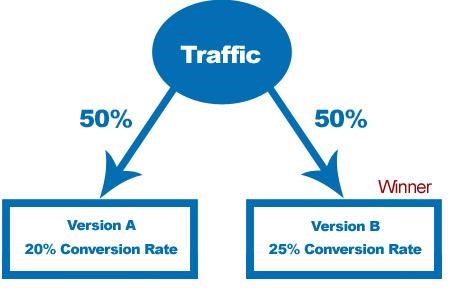
This will show you the effects a video has on your site. Studies have shown that video attracts 2-times as many monthly visitors, doubles time on your site, and has a 157% increase in organic traffic from search engines.
Day 5
Put aside a budget and use Google AdWords to drive traffic. In a study, Google found YouTube ads increased viewership to websites by 20%.
or
Put aside a budget to use on YouTube Trueview. These are the ads that show up when people play YouTube videos. The way it works, you are only charged when a person watches the entire clip.
Day 6
Find ways to create backlinks to your video. Backlinks are links that bring a clicker to your website & video. The more backlinks there are, the most chances you have that someone will come see your video.
Another advantage of backlinks is that Google uses backlinks as part of their measurements that determine the pagerank of your site/video. The more backlinks you have, the higher your video will show up on keyword searches.
Day 7
See if you can benefit from YouTube Fan Finder. Depending on your video content and how often you create video, YouTube might even promote your channel for free.
 Always pushing his own limits,Mike Tyler, has a track record for success in both business and in the creative worlds. He found his inspiration to battle for what he believes in on a trip around the world. His dedication to perfection, professionalism and focus have helped put Mike on the map as a rising force. Traveling around the world following the surf and living like the locals can do wonderful things to a person. For Mike the people and places rekindled a passion that brought him back to Vancouver. Mike’s focus is people, with a peerlessly sharp eye for detail, Mike Tyler brings a personal touch to his client’s work. You can connect with Mike on LinkedIn or Google+.
You should create video often. A study claims that a YouTube partner who has been regularly uploading videos has increased his earnings by 300% over the course of 8 weeks.
Creating the universe in 7 days is pretty difficult. Finding an audience for your videos shouldn’t be.
If You Could Ask Only One Question of Your Visitors, What Should It Be?
Conversion Marketing StrategyBrian Massey posed a great question to me the other day: If you could ask your site visitors only one question, what should it be? I love this question because it distills pre-conversion user research down to its essence: how can you best glean the “why” motivations behind what your users are thinking – and, equally importantly, the concerns they may be feeling – early in their experience? And how can you choose a question that, after you analyze user responses, will be actionable – will allow you to confidently make and test design updates that better address these concerns and improve your conversions?
In this article I’ll focus on what question to ask, and in a future article I’ll unpack where and how you should ask this question.
Start with the research end in mind
Start with the insights goal you’re trying to achieve by asking the question. Are you trying to expose the general concerns or questions (what marketers call “objections”) your visitors may have, or are you more interested in learning something more specific, such as whether your Product Detail page is missing any key information? If you’re new to user experience research, or your website hasn’t undergone any significant usability testing, you should typically start with the “general” goal and ask more open-ended questions.
In this article I’ll assume that you are asking the question of a person who doesn’t yet know and trust your brand and is early in her shopping experience (e.g. just arrived on your website or landing page). A different question – or set of questions – would apply for your converted customers.
First, avoid asking the wrong questions
First, let’s talk about questions you shouldn’t ask. The prospect is already on your site, so clearly your marketing has worked (at least partially). So early in the experience you should avoid asking marketing questions like:
Instead, focus on the questions most tied to your research goals, and that uncover questions and concerns that would negatively affect your visitor engagement and conversion. Save the marketing questions for further down your sales funnel – for example, on order confirmation pages, in your social media channels, or on your email response pages.
Some possible questions
OK, let’s finally get to the question you should ask. Based on my experience leading research projects for six Fortune 500 clients, and my recent survey of the latest user feedback solicitation tools, here are my top 5 possible questions (in no particular order), along with some pros and cons for each:
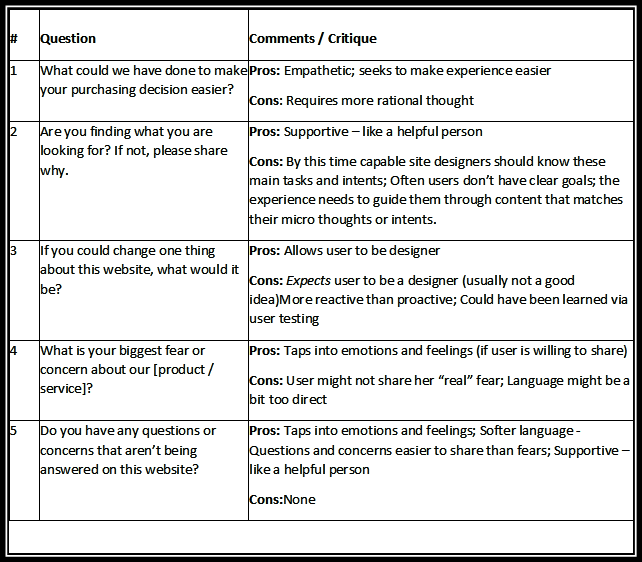
Drumroll, please…
In my opinion, the #1 question I would ask is Question #5. Coming in a “Close 2nd” is Question #4.
The two questions are really variations on the same theme. By asking either of them you are communicating, “I value you as a potential customer and am truly interested in learning where our website is missing the mark relative to your needs, wants and expectations. This question is specifically not calling attention to your offer, it’s not “going for the close”, and it’s not asking your visitors to be designers; it’s simply saying “we care, we want to improve your experience, and we’re listening.”
A key thing to remember: for many shopping scenarios, “making a positive brand impression” or “building brand memory” is as important as closing a sale or generating a lead. Connect with the visitor first; sell to her later. Another thing to bear in mind: with the rapid growth of mobile devices usage, prospect experiences are often multi-touch: the prospect hits your website on their iPad the evening of Day 1, briefly visits your site during lunch on Day 2, and again visits your site during an afternoon coffee break on Day 2. So, except in some small dollar amount, single widget sales cases, it’s not a “once and done” interaction (or if it is, it shouldn’t be).
A sample scenario
Let’s say that Judy, a middle-aged woman from Austin, is shopping for a place to board her dog Max while she’s on vacation. She’s willing to pay extra for a better facility and service. After doing a web search for “dog boarders austin,” she lands on www.campbowwow.com.
Judy’s main concerns are:
Judy sees that these questions are not answered on the top half of the home page. After about 10 seconds of scanning, she’s a bit disappointed and clicks her browser’s Back button. End of experience – for now and perhaps forever.
If our “one question” were asked, she’d have the choice (and who doesn’t like choices?!) to express her questions and concerns. Even if Judy decides to go with another dog boarder this time, there’s a decent chance that a thought like, “Ah yes… Camp Bow Wow… they were the ones who asked for my input,” will get lodged in her longer-term memory. If she were not completely satisfied with the other boarder’s services or staff, a couple weeks before her next trip she might just give Camp Bow Wow a call.
Summing up
Whether or not you consider your organization “customer centric”, you need to start a dialog with your prospects. And the sooner you can do this, the better (both in the experience, and on your website release roadmap). By doing so you’ll discover expectations that your site is not meeting so that you can better address them through user experience and copy updates, and thereby grow your bottom line.
About the Author
Mark is the Owner and Research Director at Hallmark Experience, an agency that focuses on voice of prospect research, usability testing and expert design reviews. He’s had the privilege to work with top brands like Macys, Kaiser Permanente, American Express and AutoZone, as well as smaller, fast-growing companies in the San Diego area. You can reach him here.
Heartbleed Has Taken Trust Away from Your Website
Conversion Marketing StrategyWe have begun tracking the Heartbleed Bug across the Internet, and wanted to update you with information to help you minimize the impact on your conversion rate and your sales.
The Heartbleed bug is a major setback for ecommerce sites, online services, and subscription sites, even if your site is not affected by the bug.
Heartbleed is an error in an encryption library used by many companies. This library, called Open SSL, is used to encrypt information such as your username and password between your browser and your servers so others can’t listen in. Because of the Heartbleed bug, others have probably been listening.
Visitor Trust Has Been Shaken
Basically, any site that has a login could be using this buggy Open SSL library to encrypt our login information.
It doesn’t matter if your site isn’t affected. The perception is that every site is affected.
Your visitors are now approaching your site with less trust.
Even if you aren’t affected by the Heartbleed bug, visitors will approach you with higher levels of trepidation.
You need to act.
Make it Easy to Change Passwords
Restoring trust to a person who is frustrated by the amount of work this bug has created for them is critical. If you take it seriously, you can gain trust faster than competing sites.
As we speak, your visitors are deleting their memorized passwords and cookies. They are going to come to your site as a stranger.
They may have forgotten their passwords. This is OK, as it is recommended that we all change all of our passwords. Nonetheless, you should make it easy for visitors to recover and change their password.
Your forgotten password functionality should contain a few important features.
Make it easy for them to recover their account and change their password. That builds trust.
Announce That Visitors are Safe
Once you’re sure that your site is not vulnerable (either through a patch or because you don’t use the broken SSL libraries) you need to make it clear to your visitors that this is the case.
Again: even if your site never suffered from the bug, you need to let visitors know that their info is safe.
The Heartbleed logo is going to become well known among those who are concerned. In the image at left, I’ve incorporated the logo into a “Heartbleed Safe” badge. The logo will draw the eye and the message is that they can buy from you and login without worry.
Clicking the badge should take the visitor to a page telling them how to change their password. You can also advise them to delete their cookies and passwords in their browser. This will make them safer, and make it harder for them to do business on your competitors’ sites, if the competition hasn’t read this column.
Give them the basics on Heartbleed. Some resource are given below.
Don’t Forget Email. Be sure the send an email to your subscribers or account holders. Link them to the resource page you created for the badge.
Resources
Announcements are or should soon be coming from host platforms such as InfusionSoft, Drupal, Joomla. We have announcements from Amazon and Yahoo that may apply to you. If you are on Shopify, people are talking about Heartbleed. If your code is on Github, you need to take action.
We’ll update this list as new resources come online.
UPDATE: We have confirmed that split testing tools Optimizely and Visual Website Optimizer have patched their systems. It is a good time to update you passwords with them.
Heartbleed.com
There are several sites that allow users to check your site for the Heartbleed bug. These systems may not be 100% accurate and may finger your site incorrectly. Make sure your site is OK.
LastPass Heartbleed Checker
Filippo.io Heartbleed Checker
Brian Massey