
Joel Harvey, Conversion Scientist™
This post is excerpted from Designing from the Mobile Web 2.0 by Joel Harvey. Joel discusses what he’s been learning through the tests that Conversion Sciences has done for the mobile web. You can begin to take these as new hypotheses in your business so that your mobile devices and your mobile traffic is converting at higher and higher levels.
I’m sure mobile’s on the top of your mind.
We have tested hundreds of mobile hypotheses over the last couple of years and we’ve learned a lot. There’s still a lot that we don’t know.
We’re going to share some of the key things that we’ve learned along the way with you and show you what you need to be focusing on to start driving wins in your mobile traffic.
Mobile-Friendly Redesign and Best Practices
We are not here to talk about mobile optimization best practices. No, mobile best practices don’t really exist yet. Mobile best practices are a monster that lurks in our marketing. We call it the Bestpracticlops.
The Bestpracticlops reminds us how dangerous the phrase “best practice” is, and how dangerous best practices can be. We’re going to talk a little bit about that before we really dive into the meat of mobile-friendly redesigns.
Don’t let the Bestpracticlopse devour your mobile website.
A Best Practice is a commercial or a professional procedure that is accepted or prescribed as being the most effective.
What does that really mean?
It’s something that works everywhere all the time. That’s what a true best practice would be.
Now let’s compare that with the definition of conversion optimization
Conversion Optimization is “The process of generating and using data to improve a site’s unique experience for key segments.”
In other words, conversion optimization is finding the unique things on your unique site that drive your unique visitors to do more of what you want them to do. This is fundamentally different than the definition of best practice – something that works everywhere all the time.
They don’t live together nicely.
There is an almost infinite number of things that you can consider for testing on a website. There are an infinite number of things you could test on a website. Clearly, many of them aren’t really worth testing. Just in the mobile world alone, you could ask, “What kind of device type are we talking about?”
What’s the operating system?
- Is it Android?
- Is it iOS?
- Is it Windows?
- What browser are they using?
- What’s the screen size?
- What do we think the load time is of the page?
- Is this a new visitor or a return visitor?
- Is this a regular desktop site being shown on the mobile device?
- Is this a responsive site adjusting itself to the mobile device?
- Is it a mobile dedicated site?
- What promotion brought them here?
- What’s the site speed?
- What’s the speed of the network connection?
- Is it in landscape or horizontal mode?
Those are just a few of the things that you have to consider, not to mention the most important things like:
- What is my offer?
- What is the content?
- What is the copy?
- What is the design and layout?
We don’t want to make you feel overwhelmed. We want you to avoid this misconception of best practices: Whenever you’re faced with an infinity monster of choices, what do you do? You might want to reach for something easy. You might look for a best practices unicorn riding a rainbow that you can get on and ride to higher conversion rates.

Best practices are like Unicorns. They sound great, but don’t really exist.
You might be tempted to say, “Best practices. That’s going to make this easy. We don’t have to worry about the infinity monster anymore. We’ve got something in the bag.” The truth is that 50% of your ideas, at best, are going to be wrong and I can say this from years of experience.
Our process at Conversion Sciences is to painstakingly go through the data and the site and come up with a list of hypotheses. We have a fairly sophisticated methodology for going through and ranking those hypotheses based on what we think have the best chance of winning.
Yet, on our best day, half of those hypotheses don’t result in a lift in conversion.
Yet, on our best day, half of those hypotheses don’t result in a lift in conversion. That’s not because they’re ill-conceived or they’re just filler and fluff that we throw into the list. It’s because your visitors are very different from us and we really don’t understand them.
If you take that and apply it to the concept of best practices, particularly mobile best practices, you’re faced with a 50% success rate at best if you just start rolling things onto your site.
I’m going to show you some things that have worked for us. If you want to, you can just start rolling stuff out onto your site. However, I would highly encourage you to test it because what works on one site in the same industry doesn’t work on another site in that same industry.
And this is where we get the Bestpracticlops. You have a few failed tests and say, “We tried some things that those experts said worked and it didn’t for us, and therefore, optimization doesn’t work. We should focus on something else.”
Don’t fall into that trap.
Mobile Visitors Want Something, Well, Mobile
Whenever we think about mobile websites — and this is really true of all websites – we find that visitors don’t want what we’ve built for them.
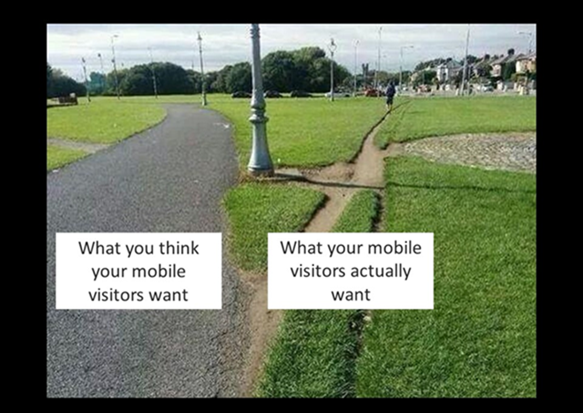
Your mobile visitors will cut their own path to a solution. Mobile-friendly redesign must take this into account.
You may be familiar with the concept of desire lines. Universities, state capitols, and other places, landscape engineers go to great pains to lay out what they think are the best routes for sidewalks, and what you inevitably find is that the visitors, the users of those sidewalks, pick their own path.
We know for a fact that this is absolutely true in mobile. The problem is it’s harder for a visitor to cut through to a desire line on mobile. You design for what you think your mobile visitors want, and this is different from what they actually want. I guarantee you these are two distinctly different things.
Furthermore, your optimized mobile experience is going to be different from everybody else’s, even more so than on the desktop. The best way to understand the desired path is through analysis and testing. The data will tell you.
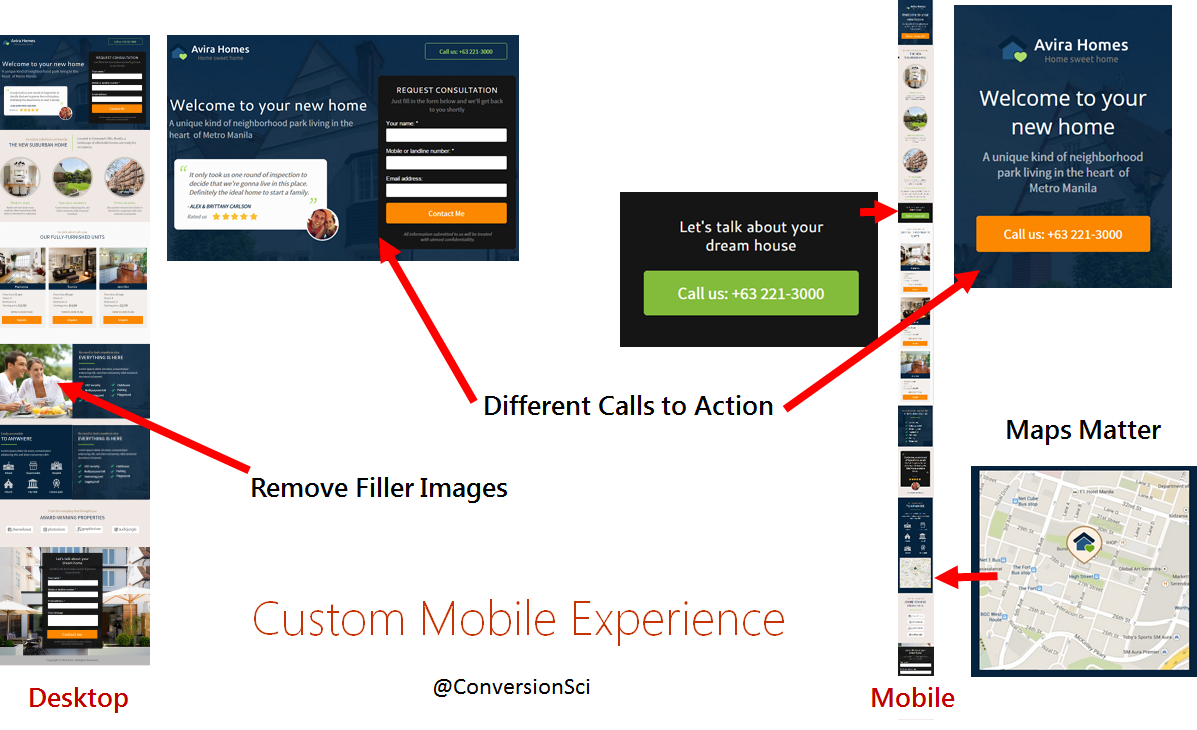
Mobile visitors want different features, faster load times and mobile calls to action.
Mobile Traffic is One of Your Fastest Growing Segments
If this sounds like a lot of work, it is most likely worth it, no matter the industry you are in. The red-dotted line shows in the graph below shows that in just 14 months the percentage of people visiting this ecommerce site on mobile has grown from 20 up to 35%.
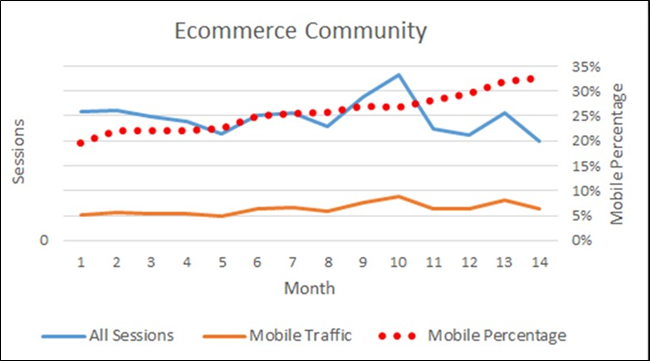
Mobile growth as a percentage of all visits for an ecommerce community.
This has real life implications on your site-wide conversion rate. For this particular audience, most people don’t buy on a mobile. So you have an ever increasing percentage of your traffic coming out on a device that, so far, doesn’t produce the same level of revenue.
The Mobile Screen is Screen One
More and more of your visitors’ first interactions with you will be on a mobile device. It’s important to understand this. In this section, we’re going to talk about dedicated mobile websites or heavily QA’d responsive websites.
Mobile is the first impression.
When someone’s decided they’re going to buy a new TV, what do they do? They pick up their mobile device whenever they’re stopped at a traffic light, whenever they’re waiting in line, whenever they’re sitting in a restaurant waiting for a friend. They start doing some simple searches.
“Best LCD TV over 52 inches”
These visitors are trying to get a sense of what their consideration set is. The consideration set is comprised of all the different specs and brands that you want to consider for the television.
The next question is, “I’ve discovered what the one or two things that I want to buy are. Now I have to figure out who I want to buy them from.”
The research that creates those two consideration sets doesn’t happen in mutually exclusive websites either. In doing these exploratory searches and they’re more likely to land on real merchant sites than on sites like Consumer Reports. They’re going to land on Best Buy. They’re going to land on Fry’s. They’re going to land on competing sites.
They’re not coming to buy right then. They’re landing to understand what they want and who might be able to provide it for them.
And this happens across any industry, whether it’s ecommerce or lead generation.
In the beginning, when people are in tire-kicking mode, at the very top of the funnel, they’re using their mobile device to figure out what they want and who might be able to provide it for them. The key is making sure that you are positioned to make a great first impression, and putting yourself in a position to be the website that they come back to whenever they’re actually ready to make a decision about who to buy from or who to submit their information to.
It’s a pretty simple concept. Give them a win.
If you forget that, you’re going to start making your mobile site work like your desktop site, and you’re going to lose when you do that.
Responsive Web Design. What Could Go Wrong?
One of the hottest topics in web design today is responsive web design (RWD). Remember the Bestpracticlops? The Bestpracticlops thrives on mobile responsive design.
Many sites have gone responsive in the last year. Many of you moved quickly, quicker than you would have liked to, in making your sites responsive thanks to Google’s Mobilegeddon update. It turned out not to be such a big deal.
I certainly know we were taking phone call after phone call saying, “We’ve got to go to responsive because of Google and can you help us do that in like six weeks?”
The truth about responsive templates is that they make decisions for you and, unfortunately, those decisions are not always good. Think about this: You have very unsophisticated technology trying to say in real time, “Based on the screen size of this device, I need to move this element, eliminate this one and to change the order of these others.” It’s not artificial intelligence here. It’s really dumb technology making decisions about how to fit stuff on a screen that’s 3 or 5 inches wide from a site designed for a 17 inch screen.
What could go wrong?
When Mobile-Friendly Redesign Becomes User-Unfriendly Redesign
The following image shows a pay-per-click landing page for Banfield Pet Hospital. They are spending pay-per-click money to get people to this page. The mobile landing page is inset over the desktop landing page.
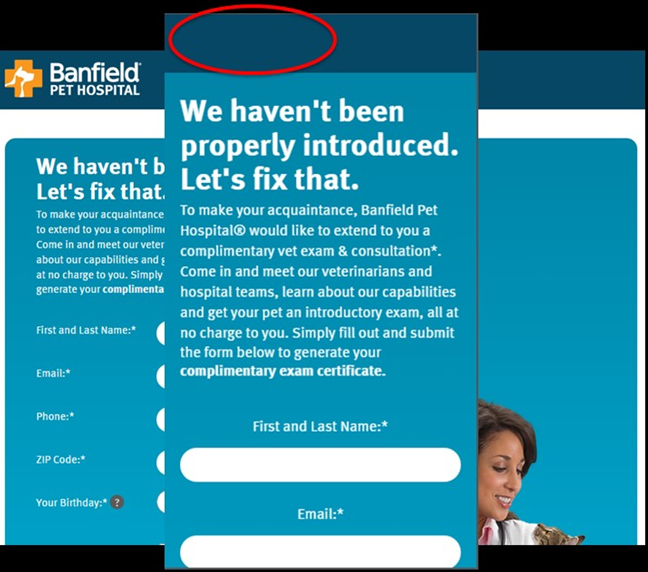
Banfield’s responsive web design decided the company logo wasn’t important on small-screens.
Do you see what’s missing?
The most important trust-builder on the page has been removed – the logo. This initial credibility and trust builder has been amputated by the responsive design. This responsive template made a decision to simply remove the company’s logo. The headline is quite ironic in this case. We have not been properly introduced because there’s no branding.

Layout issues, “scroll jails” and “click jails” are symptoms of responsive web design.
Responsive designs can make a number of poor decisions, so many in fact that we wonder, “Why not just design for mobile specifically?”
Responsive designs can make a number of poor decisions, so many in fact that we wonder, “Why not just design for mobile specifically?”
What’s missing from the mobile image below?
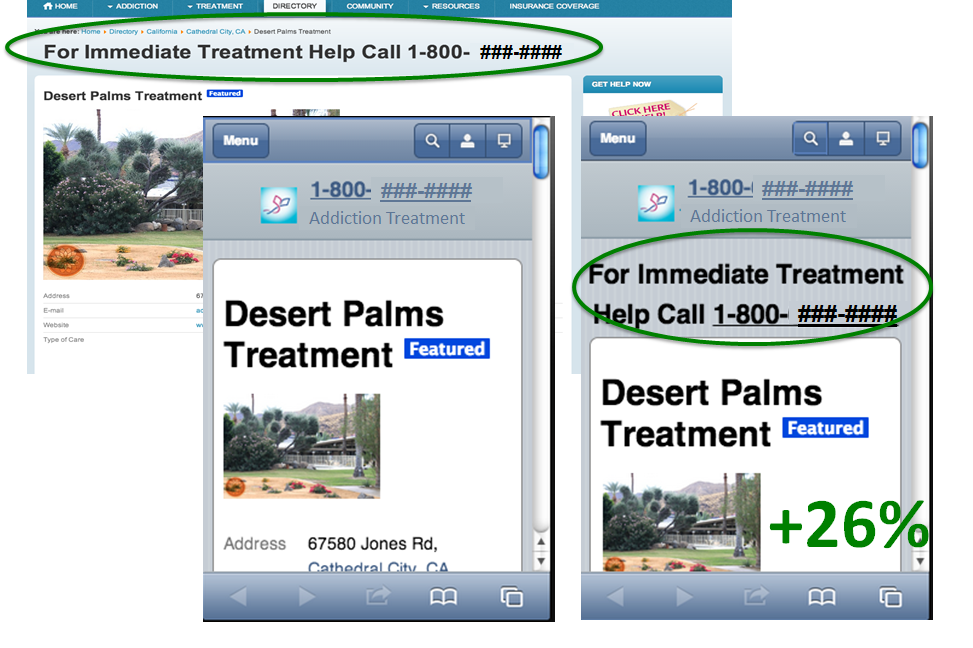
The mobile screen on the left shows that an important headline was removed by the responsive template. Adding it back increased calls by 26%.
The responsive template decided to remove the headline on small-screen devices. Since mobile visitors are different than desktop visitors, we tested what would happen if we fixed this responsive decision. We told the responsive design, “Don’t make that decision. You’re bad. You made a stupid decision. Now sit in the corner.”
We found that returning this powerful headline to mobile devices delivered 26% more mobile phone calls.
This is real. This happens. We see this happen even today.
Responsive Web Design Delivers Slower Mobile Experiences
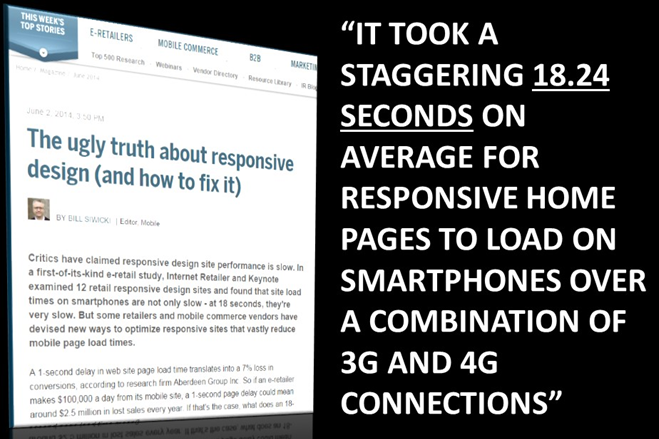
Responsive web designs don’t eliminate the fat when switching to mobile screens.
Internet Retailer did a study and found that, for large responsive ecommerce sites, the average load time just for the homepage was 18.24 seconds. We’re not talking about a category page that could have dozens of images in this case.
That is about 16 seconds too long probably, especially for mobile visitors.
Mobile visitors are really impatient. They are in the moment. We’re getting more and more impatient, and mobile visitors make desktop visitors look like the Dalai Lama when it comes to patience.
A mobile site with an 18 second load time is like shooting yourself in the foot. It’s like shooting yourself in both feet, and both knees. If you’re lucky it stops there.
Redesign Your Desktop Site to be Mobile Friendly? Really?
You don’t just get to make the mobile site responsive. The desktop site won’t remain the same.
The desktop site is probably your bread and butter for most of the people listening to this. You have to redesign your desktop site to have a responsive mobile site. Here’s what we know about redesigns: they almost always result in a decrease in conversion rate.
Sorry, we’ve seen it too many times.
In short, we recommend that you keep your high-converting desktop site as it is and optimize for that traffic. Build out your mobile-friendly site using a separate, adaptive web design. Then optimize that mobile traffic for the unique experience they want.
We’ll talk about what you should try on your mobile site.
NOTE: we find that a responsive web design works well for desktop and tablet-sized screens.
Mobile-Friendly Redesign Based on Data
Since every mobile audience is different, you’ll be well-served if you use your behavioral data to guide your mobile-friendly redesign. This includes:
- User Testing
- Surveys
- Web Analytics
- AB Testing Results
At the very least, you have the web analytics data and the recommendations here to guide you to mobile AB testing for results.
Conversion Sciences make mobile a part of every conversion optimization project. Contact us for a free consultation.


4 Mobile AB Testing Ideas that Worked for Our Clients
CRO Tests | Multivariate | AB TestingJoel Harvey, Conversion Scientist™
This post is excerpted from Designing from the Mobile Web 2.0 by Joel Harvey. Joel discusses what he’s been learning through the tests that Conversion Sciences has done for the mobile web. You can begin to take these as new hypotheses in your business so that your mobile devices and your mobile traffic is converting at higher and higher levels.
I’m sure mobile’s on the top of your mind.
We have tested hundreds of mobile hypotheses over the last couple of years and we’ve learned a lot. There’s still a lot that we don’t know.
We’re going to share some of the key things that we’ve learned along the way with you and show you what you need to be focusing on to start driving wins in your mobile traffic.
[mobile-web-20]
What Mobile AB Tests Can You Try Right Now?
What are some of the things you can AB test right now to start driving higher mobile conversions?
Here are the hypotheses we’ve tested and things that we’ve seen give us increases across dozens of mobile websites. Some of them are very site specific like the offer link and the copy. This is one thing that yields big results in any business and there’s no one rule of thumb that we can share.
However, there are some things you can do with layout and with execution that, with the right words and the right elements, work across almost many mobile sites.
1. Sticky Headers and Footers
For anybody that doesn’t know, what we mean by a “sticky” header or footer, we mean a “bar” of content that persists at the top of the screen. It sticks even when the visitor scrolls.
By locking this on the screen as people scroll we always keep in their view. Just making the existing header sticky, we saw a 9% increase in phone calls for this site. We’ve seen this on ecommerce sites, increasing form fill completion and purchases.
For a follow-up test, we simply added a call to action. The text delivered a relatively large increase in phone calls on top of the increase from adding the sticky header.
There are a number of things you can put into a header.
Over time this has continued to evolve and conversions have increased.
In our experience, sticky footers, or bars that persist across the bottom of the screen, may work better for your audience. We recommend that you try them both.
2. Persistent Calls to Action
Persistent calls to action or parachutes are offers that remain on the screen as the visitor scrolls. These are usually found as the footer.
It’s very similar to a sticky header.
The site at left enjoyed a 20% increase in registrations from a sticky header. The site at right saw a 45% from top and bottom stickies.
Since we found that these parachutes work well as top “stickies” and bottom “stickies, we wondered if we could do both. Our original thought was that it took up too much screen real estate, that it was too much to keep in front of the visitor. However, we found that in most cases you can have both and they’re very complimentary to one another.
We recommend testing to find the right call to action first, and then testing a persistent, or “sticky” call to action.
So why do we call it a parachute?
We call it a parachute because we know that mobile visitors will scroll much farther down a page and much faster than desktop visitors. This is an interesting fact: Mobile visitors are more likely to see all of the content on your page than a desktop user, especially if you have a lot of content and it’s a long page. You can see this in your own scroll maps and in session recordings.
The problem is that they do it fast and they sometimes get lost. Having a parachute someplace for the them to parachute out of this purgatory they’ve gotten themselves into is proving to be very helpful.
Check Your Tel-Links
The Safari mobile browser doesn’t necessarily do a fantastic job of identifying phone numbers and turning them into click-to-call, or tel-links.
Anywhere where you have a phone number on your site, make sure you’ve explicitly written the tel-link around that phone number.
In the example above, we found this site didn’t have click-to-call. We tested adding the tel-link functionality explicitly, and we saw a 20% increase just in clicks to call. It makes sense. You’re on your mobile device. You don’t have to put it down, write the number down, and then type it in.
There are phones built into these mobile devices, aren’t there?
3. Footer Content
This issue dovetails in with what we were just saying about how far a mobile visitor will scroll.
Mobile visitors are much more likely to see the footer of your site. They bounce on the bottom after fast scrolling. On the desktop the footer of the site is this graveyard of crap that we throw into the bottom. It’s the detritus of the site. It usually includes the privacy policy and some legalese, things that are not really going to compel anybody to take action.
Yet, the visitors that scroll to the bottom of your page may be very interested. What are you telling them? “Copyright 2015?” This is not really a deal closer.
We saw on our scroll map reports that about 50% of mobile visitors reach the bottom of these pages. Page footer are rarely inspiring.
Why not do something a little bit more compelling? We changed this to reiterate the value proposition. Why should someone call, and how we can this company help?
We saw about an 8% increase in calls with this very simple change.
The Footer on Mobile is not a Graveyard
We’ll take 8% lifts all day and night.
Mobile will make up between 40% and 60% of almost anybody’s traffic at this point in time. We see some outliers, but more or less that’s the range. So let’s just say it’s 50%.
An 8% increase on mobile is a 4% increase on your entire business. There’s not many things that you can do to magically get a 4% increase for your entire business. This is an example of one of those things you can do.
It’s the beauty of conversion optimization. It’s a huge lever to grow your business. Something as simple as making an offer in the footer to reiterate your value proposition can have a meaningful impact on your business.
Get people to take action once they get to the bottom of that page.
[mobile-web-20]
4. Optimize for the Right Goals
What mobile goals are you optimizing for? Are they the right ones?
Conversion for your mobile visitors should look different than conversion for your desktop visitors. One of the ways to really leverage the growth in mobile is to understand and accept that.
One of our clients, eSigns.com, allows visitors to design vinyl banners and other signs for their event, yard, etc. It’s a phenomenal tool and a great site. Unfortunately, it is Flash-based tool, and it doesn’t work on iOS or Android devices. Even if it did work, visitors are less likely to design a banner or a sign on their small-screen mobile device.
Essentially we had this mobile dead end. Mobile traffic simply could not convert. eSigns had become resigned to ignoring their mobile traffic.
But we said, “What could we do with this traffic?” We chose to focus on getting email addresses instead.
We shifted our objective.
This mobile entrance overlay enticed mobile visitors to give us their email address.
Instead of saying, “We need to get more conversions and more immediate revenue out of mobile visitors,” we said, “Let’s just focus on getting your email address”. We could tell from upstream indicators that these people are really just kicking tires.
Remember, we’re addressing a consideration set. We decided to do something to remain in their consideration set. Ask them to give us their name and email address. In return, we offered to email them a link to this page so they can come back to it later, on their desktop, when they are ready to do the design.
The results are that 5.3% of the visitors gave us their name and email address. Not bad, especially for an unoptimized experience. Each person who completed this form received an email with a link to that page, and the link was specially coded so we could track it and track those visitors.
Of those who got our email, we found that 26% of the recipients of this email clicked back to the site. Now this didn’t really result in an immediate boost in revenue from those clicks, but it lit a fire under their email list growth rate. They gathered almost 1,400 new email addresses in the first month of this test.
This is a business like many of your businesses that ultimately live and die by their email list. Building your email list gives you control over your own destiny. The marginal cost of delivery is almost zero. Not just for every single recipient of your email, but for every email. It’s so cheap to create new customers and satisfy repeat customers.
To get an idea of just how valuable these new email addresses were, we calculated the value of every recipient of eSign’s emails. We’re fond of a metric whenever we’re evaluating an email called revenue per recipient (RPR).
Collecting emails from the mobile deadend delivered an estimated $200,000 in additional annual revenue.
For eSigns, we calculated that the average annual revenue per recipient to be $11. With an average of 1,400 new email addresses per month, we’re generating almost $200,000 in additional annual income. Instead of ignoring mobile traffic, we took a longer-term approach by getting their email address, and using email to convert them.
Take a hard look at what your mobile visitors will be willing to do to begin a conversation with you.
Do This Now
These are our main premises. We hope you agree.
If you buy into our beliefs, these are the things you should try right now on your mobile traffic.
Once you’ve nailed your mobile experience, you can start having fun with your mobile site, like this add-to-cart animation.
You can have fun when you’ve delivered the mobile experience your visitors want.
How to Avoid Mobile-Friendly Redesign Disasters
Conversion-Centered DesignJoel Harvey, Conversion Scientist™
This post is excerpted from Designing from the Mobile Web 2.0 by Joel Harvey. Joel discusses what he’s been learning through the tests that Conversion Sciences has done for the mobile web. You can begin to take these as new hypotheses in your business so that your mobile devices and your mobile traffic is converting at higher and higher levels.
I’m sure mobile’s on the top of your mind.
We have tested hundreds of mobile hypotheses over the last couple of years and we’ve learned a lot. There’s still a lot that we don’t know.
We’re going to share some of the key things that we’ve learned along the way with you and show you what you need to be focusing on to start driving wins in your mobile traffic.
Mobile-Friendly Redesign and Best Practices
We are not here to talk about mobile optimization best practices. No, mobile best practices don’t really exist yet. Mobile best practices are a monster that lurks in our marketing. We call it the Bestpracticlops.
The Bestpracticlops reminds us how dangerous the phrase “best practice” is, and how dangerous best practices can be. We’re going to talk a little bit about that before we really dive into the meat of mobile-friendly redesigns.
Don’t let the Bestpracticlopse devour your mobile website.
What does that really mean?
It’s something that works everywhere all the time. That’s what a true best practice would be.
Now let’s compare that with the definition of conversion optimization
In other words, conversion optimization is finding the unique things on your unique site that drive your unique visitors to do more of what you want them to do. This is fundamentally different than the definition of best practice – something that works everywhere all the time.
They don’t live together nicely.
There is an almost infinite number of things that you can consider for testing on a website. There are an infinite number of things you could test on a website. Clearly, many of them aren’t really worth testing. Just in the mobile world alone, you could ask, “What kind of device type are we talking about?”
What’s the operating system?
Those are just a few of the things that you have to consider, not to mention the most important things like:
We don’t want to make you feel overwhelmed. We want you to avoid this misconception of best practices: Whenever you’re faced with an infinity monster of choices, what do you do? You might want to reach for something easy. You might look for a best practices unicorn riding a rainbow that you can get on and ride to higher conversion rates.
Best practices are like Unicorns. They sound great, but don’t really exist.
You might be tempted to say, “Best practices. That’s going to make this easy. We don’t have to worry about the infinity monster anymore. We’ve got something in the bag.” The truth is that 50% of your ideas, at best, are going to be wrong and I can say this from years of experience.
Our process at Conversion Sciences is to painstakingly go through the data and the site and come up with a list of hypotheses. We have a fairly sophisticated methodology for going through and ranking those hypotheses based on what we think have the best chance of winning.
Yet, on our best day, half of those hypotheses don’t result in a lift in conversion. That’s not because they’re ill-conceived or they’re just filler and fluff that we throw into the list. It’s because your visitors are very different from us and we really don’t understand them.If you take that and apply it to the concept of best practices, particularly mobile best practices, you’re faced with a 50% success rate at best if you just start rolling things onto your site.
I’m going to show you some things that have worked for us. If you want to, you can just start rolling stuff out onto your site. However, I would highly encourage you to test it because what works on one site in the same industry doesn’t work on another site in that same industry.
And this is where we get the Bestpracticlops. You have a few failed tests and say, “We tried some things that those experts said worked and it didn’t for us, and therefore, optimization doesn’t work. We should focus on something else.”
Don’t fall into that trap.
Mobile Visitors Want Something, Well, Mobile
Whenever we think about mobile websites — and this is really true of all websites – we find that visitors don’t want what we’ve built for them.
Your mobile visitors will cut their own path to a solution. Mobile-friendly redesign must take this into account.
You may be familiar with the concept of desire lines. Universities, state capitols, and other places, landscape engineers go to great pains to lay out what they think are the best routes for sidewalks, and what you inevitably find is that the visitors, the users of those sidewalks, pick their own path.
We know for a fact that this is absolutely true in mobile. The problem is it’s harder for a visitor to cut through to a desire line on mobile. You design for what you think your mobile visitors want, and this is different from what they actually want. I guarantee you these are two distinctly different things.
Furthermore, your optimized mobile experience is going to be different from everybody else’s, even more so than on the desktop. The best way to understand the desired path is through analysis and testing. The data will tell you.
Mobile visitors want different features, faster load times and mobile calls to action.
Mobile Traffic is One of Your Fastest Growing Segments
If this sounds like a lot of work, it is most likely worth it, no matter the industry you are in. The red-dotted line shows in the graph below shows that in just 14 months the percentage of people visiting this ecommerce site on mobile has grown from 20 up to 35%.
Mobile growth as a percentage of all visits for an ecommerce community.
This has real life implications on your site-wide conversion rate. For this particular audience, most people don’t buy on a mobile. So you have an ever increasing percentage of your traffic coming out on a device that, so far, doesn’t produce the same level of revenue.
The Mobile Screen is Screen One
More and more of your visitors’ first interactions with you will be on a mobile device. It’s important to understand this. In this section, we’re going to talk about dedicated mobile websites or heavily QA’d responsive websites.
Mobile is the first impression.
When someone’s decided they’re going to buy a new TV, what do they do? They pick up their mobile device whenever they’re stopped at a traffic light, whenever they’re waiting in line, whenever they’re sitting in a restaurant waiting for a friend. They start doing some simple searches.
“Best LCD TV over 52 inches”
These visitors are trying to get a sense of what their consideration set is. The consideration set is comprised of all the different specs and brands that you want to consider for the television.
The next question is, “I’ve discovered what the one or two things that I want to buy are. Now I have to figure out who I want to buy them from.”
The research that creates those two consideration sets doesn’t happen in mutually exclusive websites either. In doing these exploratory searches and they’re more likely to land on real merchant sites than on sites like Consumer Reports. They’re going to land on Best Buy. They’re going to land on Fry’s. They’re going to land on competing sites.
They’re not coming to buy right then. They’re landing to understand what they want and who might be able to provide it for them.
And this happens across any industry, whether it’s ecommerce or lead generation.
In the beginning, when people are in tire-kicking mode, at the very top of the funnel, they’re using their mobile device to figure out what they want and who might be able to provide it for them. The key is making sure that you are positioned to make a great first impression, and putting yourself in a position to be the website that they come back to whenever they’re actually ready to make a decision about who to buy from or who to submit their information to.
It’s a pretty simple concept. Give them a win.
If you forget that, you’re going to start making your mobile site work like your desktop site, and you’re going to lose when you do that.
Responsive Web Design. What Could Go Wrong?
One of the hottest topics in web design today is responsive web design (RWD). Remember the Bestpracticlops? The Bestpracticlops thrives on mobile responsive design.
Many sites have gone responsive in the last year. Many of you moved quickly, quicker than you would have liked to, in making your sites responsive thanks to Google’s Mobilegeddon update. It turned out not to be such a big deal.
I certainly know we were taking phone call after phone call saying, “We’ve got to go to responsive because of Google and can you help us do that in like six weeks?”
The truth about responsive templates is that they make decisions for you and, unfortunately, those decisions are not always good. Think about this: You have very unsophisticated technology trying to say in real time, “Based on the screen size of this device, I need to move this element, eliminate this one and to change the order of these others.” It’s not artificial intelligence here. It’s really dumb technology making decisions about how to fit stuff on a screen that’s 3 or 5 inches wide from a site designed for a 17 inch screen.
What could go wrong?
When Mobile-Friendly Redesign Becomes User-Unfriendly Redesign
The following image shows a pay-per-click landing page for Banfield Pet Hospital. They are spending pay-per-click money to get people to this page. The mobile landing page is inset over the desktop landing page.
Banfield’s responsive web design decided the company logo wasn’t important on small-screens.
Do you see what’s missing?
The most important trust-builder on the page has been removed – the logo. This initial credibility and trust builder has been amputated by the responsive design. This responsive template made a decision to simply remove the company’s logo. The headline is quite ironic in this case. We have not been properly introduced because there’s no branding.
Layout issues, “scroll jails” and “click jails” are symptoms of responsive web design.
What’s missing from the mobile image below?
The mobile screen on the left shows that an important headline was removed by the responsive template. Adding it back increased calls by 26%.
The responsive template decided to remove the headline on small-screen devices. Since mobile visitors are different than desktop visitors, we tested what would happen if we fixed this responsive decision. We told the responsive design, “Don’t make that decision. You’re bad. You made a stupid decision. Now sit in the corner.”
We found that returning this powerful headline to mobile devices delivered 26% more mobile phone calls.
This is real. This happens. We see this happen even today.
Responsive Web Design Delivers Slower Mobile Experiences
Responsive web designs don’t eliminate the fat when switching to mobile screens.
Internet Retailer did a study and found that, for large responsive ecommerce sites, the average load time just for the homepage was 18.24 seconds. We’re not talking about a category page that could have dozens of images in this case.
That is about 16 seconds too long probably, especially for mobile visitors.
Mobile visitors are really impatient. They are in the moment. We’re getting more and more impatient, and mobile visitors make desktop visitors look like the Dalai Lama when it comes to patience.
A mobile site with an 18 second load time is like shooting yourself in the foot. It’s like shooting yourself in both feet, and both knees. If you’re lucky it stops there.
Redesign Your Desktop Site to be Mobile Friendly? Really?
You don’t just get to make the mobile site responsive. The desktop site won’t remain the same.
The desktop site is probably your bread and butter for most of the people listening to this. You have to redesign your desktop site to have a responsive mobile site. Here’s what we know about redesigns: they almost always result in a decrease in conversion rate.
Sorry, we’ve seen it too many times.
In short, we recommend that you keep your high-converting desktop site as it is and optimize for that traffic. Build out your mobile-friendly site using a separate, adaptive web design. Then optimize that mobile traffic for the unique experience they want.
We’ll talk about what you should try on your mobile site.
NOTE: we find that a responsive web design works well for desktop and tablet-sized screens.
Mobile-Friendly Redesign Based on Data
Since every mobile audience is different, you’ll be well-served if you use your behavioral data to guide your mobile-friendly redesign. This includes:
At the very least, you have the web analytics data and the recommendations here to guide you to mobile AB testing for results.
Conversion Sciences make mobile a part of every conversion optimization project. Contact us for a free consultation.
3 Very Different Meanings of the Word “Redesign”
Conversion OptimizationOne workplace conversation that can be particularly tricky is whether your company should redesign its website. It’s important to make sure everyone is talking about the same thing when you talk about redesign because it’s costly, risky, and emotionally charged.
There are a few common reasons companies choose to redesign their websites:
These reasons have a common denominator: you’re not happy with a very particular aspect of your site. There are many ways you can approach finding a solution to the problem, and we – the universal We – attach the word “redesign” to those solutions even though it means one of many methods are used to get the result we want.
Synonyms for redesign from dictionary.com
According to Dictionary.com, the above are some of the more common synonyms for “redesign”. The way Conversion Sciences uses this term is very industry-specific, so it has a certain jargon-y quality. Someone working in marketing at a tech or ecommerce company probably understands our jargon more than their colleagues in other departments.
If you’re that marketing person and you’re trying to convince your boss and other departments that you need conversion optimization, it’s really important that you’re all speaking the same language. You might be experiencing some miscommunication and not even realize it.
What are the different ways each of you might be using the word “redesign”?
Before you dismiss it as juvenile to keep returning to basic, dictionary definitions of “redesign”, make a mental tally of important people who don’t work in marketing, conversion optimization, or graphic design.
All of us feel great satisfaction in knowing the real definition, but ultimately being right isn’t helpful if no one understands each other.
A Full Redesign: Starting Over From Scratch
When we say “redesign” in its purest sense, we mean a brand spanking new website. You hired a designer, you have a new color palette and CSS, you completely threw out the old. Every page is new, the entire structure is different.
“Redesign” can be used to mean a brand spanking new experience
When Conversion Sciences cautions against redesigns, this is the definition we’re using. We say there are only two good reasons to undertake a website redesign:
When I worked at Westbank Library our website used a proprietary CMS built by the company that built our ILS (integrated library system). An ILS is used to search for books or connect to an online resource or check to see when books are due back. In other words, an ILS isn’t meant to be the platform for a very specific kind of online application.
Westbank’s homepage in 2008, built with a CMS that was only intended to be used for online library catalogs (screenshot via the Way Back Machine)
The ILS wouldn’t support some very important non-book-related features:
We needed a new site built on a new CMS, one that met our present-day needs. The only way to do that was to dump the old one. The new website was built using Drupal, and it meant everything was new. The change was necessary and long overdue.
Westbank’s new homepage after the from-scratch redesign (screenshot via the Way Back Machine, which is why the images aren’t loading)
We were excited that on smartphones, the phone number was tel-linked and that the site was now searchable without going back to Google. Best of all, we had an actual, legitimate calendar. Before the redesign, the best we could do was make a list of what was going on.
Calendar of events on old site
After the redesign, people could see an actual calendar with clickable events where they could go find more information.
Calendar of events on new site
Without a doubt, the new site was an immense improvement. The lack of functionality on the old site was crippling us.
In this case, a full redesign was justified, but the results weren’t what we had hoped.
21 Quick and Easy CRO Copywriting Hacks
Keep these proven copywriting hacks in mind to make your copy convert.
"*" indicates required fields
Conversion Optimization as Redesign: Making Incremental Changes
Dozens of people called us saying “I can’t find anything on this new website, you need to redesign it!” and dozens more sent us angry emails saying the same. With the amount of time we spent working on the new website, it was disheartening to hear. Small public libraries don’t have the resources to do projects like this often – and in some cases, they can’t do projects like it at all. We knew we’d been fortunate, and we were suddenly terrified we had blown our only chance to fix our site. There were very serious discussions of applying for grants, then hiring a new design team to start over.
But after spending time talking to our patrons, we’d find out what they actually meant by “redesign”.
In one case, a gentlemen received an email reminding him to renew his books and included a link for him to do it online. Before our redesign, that link took him to his library account where he was automatically logged in on his home computer. All he had to do was click “renew”. After the redesign, this link took him to our homepage, so he had no idea where to go. When we say that your landing pages need to fulfill the promises you’ve made in your ad, this is a great example of what we’re talking about. Instead of changing the design of anything, we needed to fix that link.
Another way we knew people were lost is by analyzing how they used the site.
One problem in particular was how people used our site’s search box. All of the searches were for titles of popular books and movies, but the search box wasn’t connected to the online catalog. Our old site had one search box, and its only use was to look for books and movies. Everyone assumed the new search box had the same function, but it didn’t.
Search options on the new website
We used the data from our search box the same way you can use heat maps. You can accommodate how your visitors are already using your site with the data you gather. Instead of forcing them to use our search box the way we wanted, we changed it to do what they wanted.
But that change meant our visitors, once again, didn’t have a site search option.
We changed the site search bar to be a catalog search, but it still wasn’t perfect
From this point, we found a widget that gave us a more dynamic search bar. Then we replaced images at the bottom of the page that linked to adult, teen, and children’s programs with widgets featuring new books and the library’s Instagram account. And we featured upcoming events more prominently, moved the contact information into the footer, added navigational links along the top of the page, and worked to make the site ADA compliant. The current homepage design is very different compared to what it was when we first rolled out the new website.
The homepage as it is now
These changes were slow-going, careful, and made one at a time. The redesign 1.0 and current iteration look similar because of branding and tabbed browsing, but for library patrons, these are two very disparate experiences. It is safe to say the new homepage underwent another redesign, but you might hesitate to use that word because the changes didn’t happen all at once.
Looking back at synonyms of “redesign”…
“Redesign” can be used to describe incremental changes
The website wasn’t perfect, but there was a lot to work with. We couldn’t start over every time we realized the site could be doing better.
Big Swings as Redesign: Changing Several Variables at Once
We use the term “big swing” to talk about sweeping changes we make on a page. Often these changes are on a page that’s particularly important or special, like a homepage or landing page.
It means we’ve changed several features all at once instead of testing one thing at a time. The downside of this strategy is that no matter how the page performs after the test goes live, we don’t really know why. If the page continues to perform with the exact same conversion rate, we don’t really know why: our changes may have offset each other.
Big, sweeping changes are exciting when they are successful, and people love to share these kinds of successes. They make great headlines and engaging stories. They give us hope that our big change will work out the way we want, or perhaps even better than we imagine. The problem is that there are usually third variables at play in these stories.
Think about the diet book industry. Every book boasts of its followers’ drastic life improvements due entirely to the diet. But when someone starts to pay attention to what she eats, she may also make other changes like exercising more, quitting smoking, and getting more frequent checkups with her doctor. Was her success really due to the diet book? Or was it purely chance since she made so many other changes? There’s no way to know.
Michael Scott’s Big Swing
Humans have the potential to be rational, logical creatures, but we often fall prey to our emotions when we make decisions, dole out praise, or attach blame. In an episode of The Office, Office Manager Michael Scott has the brilliant, big idea to send out paper shipments with five golden tickets tucked into the boxes at random. Each ticket awarded a 10% discount to its recipient.
The promotion quickly goes south when Dunder Mifflin’s largest client receives all five tickets, and there are no disclaimers or expiration dates. Michael arranges for a fall guy who will be fired for the idea, but then finds out this client has decided to send Dunder Mifflin even more business because of the discount. Naturally Michael wants the credit but doesn’t want to be reprimanded for almost bankrupting the company.
Michael Scott dressed as Willy Wonka, presenting his Golden Ticket idea
The Golden Ticket promotion was a big swing because Dunder Mifflin didn’t isolate the variable Michael was hoping to test: will current clients be more loyal to Dunder Mifflin because of a special, one-time-only, 10% discount?
The consequences of the Golden Ticket run the gamut of possible results of big swings:
Big Swings at Conversion Sciences
In a staff meeting last week, Conversion Scientist Megan Hoover told us, “We completely redesigned this landing page for our client, and it was a big improvement”. In a different staff meeting, fellow Conversion Scientist Chris Nolan told us, “Our first test was to redesign our client’s homepage, and it was a huge success”.
Conversion Sciences doesn’t do website redesigns, we do conversion optimization. So what did Megan and Chris mean?
These changes mean they were speaking accurately when they described their big swings as “redesigns”.
“Redesign” describes what we do when we make big swings
We didn’t change the functionality of the page, the page’s purpose, or the CMS. We definitely made some big changes, but we certainly didn’t start from scratch, and all of the changes were very localized to a landing page and a homepage.
It’s worth noting that even though it’s tough to measure results when you make a big swing type of redesign, we still take the risk sometimes because Conversion Sciences has run so many successful tests. We are very good at making educated hypotheses about what kinds of changes will work well together, but we don’t attempt these big changes often. There is a lot of room for error in the big swing.
What is Your Desired End Result?
We covered three approaches to redesign in this post:
Let’s return to the most common reasons a company chooses to redesign:
When you have the conversation at work about redesigning your site, try starting with the end goal.
If you work backwards, the conversation has a good chance of staying on track because it’s likely that everyone wants the same thing, even if it comes out of their mouths sounding very different. I’m willing to bet that everyone wants a home page with lower bounce rates. Everyone wants to reduce cart abandonment rates. Everyone wants more downloads of your industry reports. Everyone wants to sell more merchandise.
Redesigns are seductive. They come with big budgets and a chance to make a visible impact. The question at the heart of my arguments is this: do you need a website redesign, or do you need a website optimization program?
An optimization program can begin delivering results within weeks. Full redesigns take months and months to develop. An optimization program tells you which of your assumptions are good ones. Full redesigns are big gambles.
With a short Conversion Strategy Session, you will be able to make the case for a full redesign or optimization program for your growing online business. Request your free session.

AB Testing Results are Half-Filled with Losers, and That’s a Good Thing
CRO Tests | Multivariate | AB TestingIn fact, Brian Cugelman introduced me to an entire spectrum of outcomes that is helpful when evaluating AB testing results. Brian was talking about unleashing chemicals in the brain, and I’m applying his model to AB testing results. See my complete notes on his Conversion XL Live presentation below.
Understanding the AB Testing Results Map
In any test we conduct, we are trying everything we can to drive to a desired outcome. Unfortunately, we don’t always achieve the outcomes we want or intend. For any test, our results lie on one of two spectrums defining four general quadrants.
Map of possible outcomes from hypotheses.
On one axis we ask, “Was the outcome as we intended, or was there unintended result?” On the other axis we ask, “Was it a negative or positive outcome?”
While most of our testing seeks to achieve the quadrant defined by positive, intended outcomes, each of these quadrants gives us an opportunity to move our conversion optimization program a step forward.
I. Pop the Champaign, We’ve Got a New Control
With every test, we seek to “beat” the existing control, the page or experience that is currently performing the best of all treatments we’ve tried. When our intended outcome is a positive outcome, everyone is all smiles and dancing. It’s the most fun we have in this job.
In general, we want our test outcomes to fall into this quadrant (quadrant I), but not exclusively. There is much to be learned from the other three quadrants.
II. Testing to Lose
Under what circumstances would we actually run an AB test intending to see a negative outcome? That is the question of Quadrant II. A great example of this is adding “Captcha” to a form.
CAPTCHA is an acronym for “Completely Automated Public Turing test to tell Computers and Humans Apart”. We believe it should be called, “Get Our Prospects to Do Our Spam Management For Us”, or “GOPDOSMFU”. Businesses don’t like to get spam. It clogs their prospect inboxes, wastes the time of sales people and clouds their analytics.
However, we don’t believe that the answer is to make our potential customers take an IQ test before submitting a form.
These tools inevitably reduce form completion rates, and not just for spam bots.
CAPTCHAs reduce spam, but at what cost?
So, if a business wants to add Captcha to a form, we recommend understanding the hidden costs of doing so. We’ll design a test with and without the Captcha, fully expecting a negative outcome. The goal is to understand how big the negative impact is. Usually, it’s too big.
In other situations, a design feature that is brand oriented may be proposed. Often a design decision that enhances the company brand will have a negative impact on conversion and revenue. Nonetheless, we will test to see how big the negative impact is. If it’s reasonable, then the loss of revenue is seen as a marketing expense. In other words, we expect the loss of short-term revenue to offset long term revenue from a stronger brand message.
These tests are like insurance policies. We do them to understand the cost of decisions that fall outside of our narrow focus on website results. The question is not, “Is the outcome negative?” The question is, “How negative is the outcome?”
III. Losers Rule Statistically
Linus Pauling once said, “You can’t have good ideas without having lots of ideas.” What is implied in this statement is that most ideas are crap. Just because we call them test hypotheses doesn’t mean that they are any more valuable than rolls of the dice.
When we start a conversion optimization process, we generate a lot of ideas. Since we’re brilliant, experienced, and wear lab coats, we brag that only half of these ideas will be losers for any client. Fully half won’t increase the performance of the site, and many will make things worse.
Most of these fall into the quadrant of unintended negative outcomes. The control has won. Record what we learned and move on.
There is a lot to be learned from failed tests. Note that we call them “inconclusive” tests as this sounds better than “failed”.
Just like a successful test, you must ask the question, “Why?”.
Why didn’t they like our new background video? Was it offensive? Did it load too slowly? Did it distract them from our message?
Take a moment and ask, “Why,” even when your control wins.
IV. That Wasn’t Expected, But We’ll Take the Credit
Automatic.com was seeking a very specific outcome when we designed a new home page for them: more sales of the adapter and app that connects a smartphone to the car’s electronic brain. The redesign did achieve that goal. However, there was another unintended result. There was an increase in the number of people buying multiple adapters rather than just one.
We weren’t testing to increase average order value in this case. It happened nonetheless. We might have missed it if we didn’t instinctively calculate average order value when looking at the data. Other unintended consequences may be harder to find.
This outcome usually spawns new hypotheses. What was it about our new home page design that made more buyers decide to get an adapter for all of their cars? Did we discover a new segment, the segment of visitors that have more than one car?
These questions all beg for more research and quite possibly more testing.
When Outcomes are Mixed
There is rarely one answer for any test we perform. Because we have to create statistically valid sample sizes, we throw together some very different groups of visitors. For example, we regularly see a difference in conversion rates between visitors using the Safari browser and those using Firefox. On mobile, we see different results when we look only at visitors coming on an Android than when we look at those using Apple’s iOS.
Android users liked this test but iPhone users really did not.
In short, you need to spend some time looking at your test results to ensure that you don’t have offsetting outcomes.
The Motivational Chemistry and the Science of Persuasion
Here are my notes from Brian Cugelman’s presentation that inspired this approach to AB testing results. He deals a lot with the science of persuasion.
My favorite conclusions are:
“You will get more mileage from ANTICIPATION than from actual rewards.”
“Flattery will get you everywhere.”
I hope this infographic generates some dopamine for you, and your new found intelligence will produce seratonin during your next social engagement.
Motivational Chemistry infodoodle by Brian Cugelman at ConversionXL Live
9 Imaginative Approaches to AB Testing Landing Pages
CRO Tests | Multivariate | AB Testing, Landing Page OptimizationThere are a surprising number of AB tests smart marketers can run on their landing pages to ensure they’re getting the highest conversion rates possible. You already know you can experiment with different landing page elements for conversion rate optimization. Headlines, subheads, calls to action, and design elements can all be considered when building your testing hypotheses’ list.
Now, let’s kick it up a notch with these nine approaches for landing page AB Testing that may inspire you to create your own unique AB tests.
1. Create Targeted Landing Pages for A B Testing
Let’s say you are launching an advertising campaign. And you want to know what page will convert best: a generic one or a highly targeted to the audience and message. For this split test you could have ad variations that would use your generic landing page and one or more targeted landing page versions.
For example, if Shopify did an AB test between their generic vs. targeted landing pages in an advertising campaign, the control would apply to anyone looking for an eCommerce solution.
Shopify’s homepage with a generic target audience would be the control in this AB test.
For a variation or version of a landing page, they could use their page that targets booksellers.
This landing page addresses the ecommerce needs of a specific audience.
To maximize your conversions with this test, analyze your customer database to determine who your best customers are and create targeted landing pages focused on those specific groups of customers. If you do a quick Google search for Shopify’s landing pages you can see they have created targeted landing pages for their top customer segments.
Different landing pages convert different demographics and interests.
You can use these as examples of how to create targeted landing pages for your top customer groups and demographics.
2. Landing Page AB Testing: Experiment with Animated Headlines
Headlines can make or break your landing page, as they are the first words that capture your visitor’s attention. It’s a simple AB test that can make a dramatic impact on conversions, and it can be done using most AB testing tools.
The key to the headline AB test is to change nothing but the headline. For example, you can see how ActiveCampaign changed from a simple headline about their features…
ActiveCampaign’s headline about features.
…to a better headline about the benefits their customers can expect when using their service.
Headline about benefits.
This change proved to be a winner, as they have kept it since 2015 with a constantly changing message about their benefits. Therefore. test your headline.
This animated headline with benefits proved to be a winner
3. Landing Page Split Test Idea: Vary Featured Homepage Products
In most cases, your homepage will be the most popular landing page on your website. Hence, it will be a page where you should do extensive AB testing.
One test you can do to see if you can increase conversions is simply changing your featured product.
Nest does this by swapping out its popular monitoring camera (formerly Dropcam)…
Nest featuring its Nest Cam on the homepage.
…with its popular thermostat controller.
Nest featuring its thermostat on its homepage
This test is currently running (as noted by the ?alt=1 at the end of their homepage URL), so we’ll have to see which one wins in the end.
In some cases, you may want to change your featured product based on the one that is currently getting featured coverage in the media. Or whether that coverage is positive or negative.
4. Creative Landing Page AB Testing Idea: Explore Different Stories
Do stories resonate with your customers and if so, which stories translate into the most sales? Find out through AB testing. Apple did this in this past by running multiple campaigns on their website, social media, and television ads featuring stories about musicians…
Apple’s landing page story appealing to musicians
…explorers…
Apple’s story appealing to explorers
…environmentalists…
Apple’s story appealing to environmentalists
…parents…
Apple’s story appealing to parents
…and many other page visitors. The goal was to show how their products could help tell everybody’s story. No matter what they did or how much of an impact they made in the world.
Apple ultimately went back to a homepage focused on its latest products, but without AB testing, Apple couldn’t just assume that approach would convert the highest.
21 Quick and Easy CRO Copywriting Hacks
Keep these proven copywriting hacks in mind to make your copy convert.
"*" indicates required fields
5. AB Testing your Landing Page: Shift the Focus to One Product at a Time
Landing pages have better conversion rates when there is one, clear call-to-action; sometimes that CTA is buying a product. But when your top landing page is your homepage, you can’t focus on just one product, right?
Maybe you can. In the past, Logitech had a pretty standard homepage that offered up all of its products all at once to homepage visitors.
Logitech’s original, more traditional homepage
But now, Logitech gives visitors a tour through their top products, one at a time.
Logitech’s new homepage focusing on a single product
In a few moments, you are completely immersed in a particular product and its main benefit, thanks to this new landing page. It’s definitely a way of landing page AB testing you will want to try if you have a few products you can highlight in this fashion.
6. Transform Your Hero Image to Video
You know that great image of your product that you use to compel people to sign up or buy? Why not convert it into a video that dives even deeper into exactly what happens with that feature of your product. MailChimp made that change with their landing page, going from a screenshot of their newsletter designer…
Mailchimp’s landing page with an image of newsletter editor
…to a video of how their newsletter designer worked.
Video of their newsletter editor increased Mailchimp’s landing page conversion rate.
Instead of hoping that an image would convince visitors that their newsletter designer was easy to use, as the landing page claimed, the video was right there to prove it.
While their current landing page features a different, shorter animation, it still features one that demonstrates the ease of use of their newsletter designer. Thus proving that since 2012, video and animation on the landing page beats a screenshot for conversions.
7. Try a Change of Scenery: AB Testing Landing Page Copy vs Image
Sometimes it’s not text or functionality that will make your site convert better, it’s simply imagery that matches the story of your value proposition. Zillow experimented with this idea by changing the background of its search.
One variation was a neighborhood overview with home sale prices, which actually contradicts the line below the image about looking for rentals.
Zillow’s background showing homes with their prices isn’t relevant to people looking for rental property. Especially with a message at the bottom of the page specifically written for renters.
Another variation used an image of a specific home, which could appeal to both for sale and for rent searchers.
Zillow’s new image says “home” whether you’re buying or renting
It seems that they have stuck with the individual home view as it works with what most searchers are looking for.
8. Landing Page A B Testing Basics: Rearrange the Elements
It may not be your product, your service, your copy, your CTA button, your colors, or other elements on your page that are lowering your conversions. It may simply be the order in which they are presented.
Just like when you rearrange all the furniture in your house because it just doesn’t quite feel right, you might want to do the same with your landing page.
Take AgoraPulse, for example. They went from this…
AgoraPulse home page before ab testing
…to this.
AgoraPulse home page after split test
It’s easy to see why the latter layout works. It flows right into starting your free trial after a simple and convincing headline and subhead. And for visitors still not convinced they should convert, there’s simple video and bullet points to convince them to click that call to action button.
9. Copy Your Competitors
The most creative AB tests might be ones you don’t run on your own website. In addition to AB testing tools, there are tools that will alert you to when your competitors make changes to their websites. Potentially based off of their own AB Testing landing page experiments.
Rival IQ monitors your competitor’s website to see if changes have been made to it recently. The entry level plan allows you to track up to 15 companies. You’re able to track each company’s website design history along with their social media accounts, organic search rankings, and paid search traffic.
In the website history dashboard, you can view a variety of web pages from your competitor’s websites.
Depending on how long the company has been in Rival IQ’s database, you can get a couple of year’s worth of design history from each company.
ActiveCampaign’s design history over a few years
When you click on a particular month, you see the breakdown of when particular changes occurred. As well as the ability to click upon a particular design to see the full landing page.
Zeroing into the competitor’s design changes.
This will give you an idea of what AB tests a competitor has run in the past. Based on the length of time a competitor has stuck with a particular design, you will know which test was the presumed winner. That is, it was statistically significant in terms of increasing their conversions. Be it for their homepage, pricing page, features page, or other significant landing pages.
ActiveCampaign’s pricing page history
In addition, you can sign up for email alerts when your competitors make major changes to their website. This will let you know when your competitors have run new tests on their website and made changes based on their results. Or you may even see the tests themselves in action as the pages change from their original to alternative versions.
If you have a lot of competitors, and you’re not sure which to monitor, use the BuiltWith Google Chrome extension. It will help you find out if a particular competitor’s website is using AB testing software. Chances are, the ones that are will be the ones that will be making frequent changes.
BuiltWith browser extension for analytics and tracking
What are your unique approaches to Start A B testing your landing page?
If you’ve already done the standard AB tests on your landing pages, then we hope that these additional split test ideas will further help you increase website conversions. Just like it has for the brands and online businesses mentioned here.
Have you been running or reading about some interesting AB tests? We’d love to hear about them in the comments.
AB Testing Tools used by Retail Electronics Websites
Conversion OptimizationIf you compete online in the retail electronics industry, there is ample opportunity, according to a study completed by Conversion Sciences and Marketizator.
Who Should Read The Report
The report is a report card on the adoption of key website optimization tools for businesses advertising on “electronics” search keywords. It is meant for managers of websites competing for a slice of the retail electronics market like:
We believe that the lessons learned here can be applied to any online retail business with high-prices and commoditized products.
Why Focus on Website Optimization?
There is a set of tools and disciplines designed to increase the number of sales and leads generated from the traffic coming to a business website. Collectively, they are called website optimization.
In the seasonal online retail space, websites seek to achieve one or more of the following goals:
Website optimization utilizes easily-collected information to identify problems and omissions on these sites that may prevent achievement of these goals.
This information can be collected in several ways:
The existence of these tools on a website indicates that the site is collecting important information that can be used to decrease the cost of acquiring new prospects and customers.
This is a strong competitive advantage. Increasing conversion rates decreases acquisition costs, which means:
This report targets companies investing in search advertising in a variety of formats.
How much are these businesses pending on paid online advertising?
Of the businesses competing for consumer electronics sales, 83% are spending between $500 per month and $5000 per month on paid search ads. See Figure 1.
Fourteen percent are spending between $5000 and $50,000 per month, and only 3% spend more than $50,000.
Figure 1: Range of spending on paid search ads by businesses.
Web Analytics Investments
Of the organizations that spend at least $500 per month on search ads, 75% have some form of Web Analytics installed on their site. Web Analytics is a broad category of web software that in some way measures the behavior of visitors to a site. It includes most of the website optimization tools discussed in this report.
Figure 2: Breakdown of web analytics installations by ad spend.
When we break the list down into categories of spending, we find that the highest-spending organizations are less likely to have web analytics installed (77%) despite having the most to lose.
Google Analytics, a free tool, is the most pervasive analytics package, found on 77% of the sites with analytics. Adobe SiteCatalyst (formerly Omniture) is installed on 4.5% of these sites.
Optimization Software Investments
By looking at the software installed on the websites in the asset and inventory marketplace, we can get an idea of how these organizations are investing in the tools of optimization.
This doesn’t tell us how many are making good use of these tools, but indicates how many have the potential to optimize their site.
The graphic in Figure 3 shows that retailers spending $50,000 on search ads are most likely to invest in
optimization tools. Of this segment, 24% have at least one of these tools installed vs. 7.7% for the entire industry.
The largest spenders focus investments on A/B testing tools, social analytics and survey feedback solutions.
Figure 3: Adoption rate of Web optimization tools by ad spend.
Use of AB Testing Tools
It is clear from the information presented here that, the largest group of retailers – those spending between $500 and $5000 each month on search ads — invest the least in AB testing tools. Furthermore, they invest most in social media analytics tools with 6.1%.
The question is this: Do they not have the tools budget because they don’t invest in website optimization, or do they not have the tools because they don’t see optimization as important.
Certainly, both are true for some portion of the sample. However, 75% of all organizations spending at least $500 a month have web analytics installed. At some point, most of the industry came to the conclusion that you must understand the basics of your traffic.
Yet, only 7.7% have at least one website optimization tool installed.
Over 82% of organizations spending between $5,000 and $50,000 have web analytics installed, and 15.6% have some sort of investment in optimization tools.
Recommendations
Give Your Team Time to Review Analytics
Most of the businesses in our review – 75% – have gotten the message that web analytics should be installed on their website. The majority of these have installed Google Analytics, a free package with capacity to capture the behavior of their visitors.
The value of an analytics database like this is in the insights it can provide. Incentivizing your team to glean insights from this analytics database will guide online investment decisions, increasing the performance of the website.
Businesses with Smaller Ad Spends Should Focus More on Reducing Acquisition Cost
Those businesses with larger ad spends are able to bid more for better placement on their ads. Those with smaller budgets, however, will win by reducing the overall acquisition cost.
Businesses with low acquisition costs get more inquiries for less money. This is the leverage businesses with fewer resources need.
Those businesses that learn to optimize the fastest will gain a cost advantage in paid ad auctions. An investment in free and inexpensive tools, such as click tracking, screen recording and site performance solutions will tip the scales.
Given the low adoption rate of so many of these tools, schools with few resources are in a position to disrupt their competitors by investing in them.
Leverage Your Comparatively High Purchase Price
For those businesses with higher average order values, small increases in conversion rates will deliver big increases in revenue. In short, it takes less time to get your money back from an investment in website optimization.
This can be seen in the relatively high adoption rate of A/B testing tools by businesses spending between $500 and $5000 per month (21%). While these tools require a more formal discipline, they are very effective at finding increases in conversion rates month after month.
There is still a significant opportunity for businesses spending below $5,000 to drive acquisition costs down with testing.
Decrease Your Search Ad Costs
Google favors sites with better performance. The search engine gives advertisers with more relevant sites ad placement higher on the page. Data indicates that sites with lower bounce rates are given a higher quality score than sites that elicit “pogo-sticking”, that is, sites for which visitors are returning to search results pages quickly.
Website optimization will reduce bounce rates by getting visitors into the site before they jump back to their search results.
Don’t Over Invest in Social Media Sharing
It is telling that social analytics tools have the highest adoption rates among consumer electronics retailers.
Social ads are delivering qualified traffic at a relatively low cost. In our experience, social sharing has not.
Your analytics will reveal if social traffic is delivering new leads and sales for your business. If the results aren’t there, consider using this investment elsewhere.
Begin Adoption Soon
Retail marketers are clearly behind the curve in terms of their adoption of website optimization tools. This creates an opportunity in the market. However, this window will close.
As more businesses begin optimizing, it will become harder more expensive to compete for prospects online.
AB Testing Inspiration: Using Emotional Triggers
CRO Tests | Multivariate | AB TestingAB Testing is only effective when you’re testing something meaningful. This is especially true on small-screen devices we call smartphones, or “Mobile” generically.
Talia Wolf believes that the root of every conversion = Human Behavior. We certainly wouldn’t argue with her. She also believes that emotion is at the core of human behavior. Her strategy for designing web pages that leverage emotional triggers was one of our favorite at ConversionLX Live.
I took notes on her presentation and share them here as an instagraph infographic.
AB Testing Inspiration using Emotional Triggers Infographic
Four Steps to AB Testing Inspiration
The infographic covers the four steps of her process.
Emotional Competitor Analysis
According to Wolf, this step helps you understand “where the market is emotionally”. It also shows you where you fit.
Choose ten to fifteen competitors (or as many as you can) and rate each one by four criteria.
One of our Content Scientists was recently looking for a new Wacom graphics tablet. She likes to doodle. All of the retailers offered the tablet at the same price, so the only differentiator would be message, color, images, and emotional triggers.
Here are some of the sites she visited before buying.
Best Buy communicates service and trust on its product pages.
Message: Best Buy’s is trust and safety. They offer star ratings, price match guarantees, free shipping and more to show safety.
Color: The dark blue color of their site says “Trust” and “Logic” but may also say “Coldness” and “Aloofness”.
Images: In an ecommerce environment, high-resolution images are usually helpful to buyers. Interestingly, they offer pictures of all sides of the box.
Emotional Triggers: Trust us to sell the right product at the right price.
Rakuten communicates emotions of spontineity and action on its product pages.
Message: Shopping is Entertaining! We sell lots of things, and just give you the facts. This is an informational presentation with detailed headings, stocking status.
Color: Red is excitement, passion. It can also mean aggression and stimulation.
Images: Use of icons (promotions, shipping, credit card). Limited product images.
Emotional Triggers: Spontaneity. You’ve found the product. Take action.
Emotional S.W.O.T.
SWOT stands for Strengths, Weaknesses, Opportunities and Threats. It’s a common way to generate market strategies in almost any context. Wolf asks us to consider these from an emotional standpoint.
As the infographic shows, the strengths and weaknesses pertain to our business. Do we have a strong message? Are we using color and images powerfully? What emotional triggers are we tripping. The opportunities and threats relate to the industry we are in. Our emotional competitor analysis helps us define these.
Emotional Content Strategy
When we look at our emotional strengths and weaknesses, we can ask the question, “How do we want to make our customers feel?” This helps us define our emotional content strategy and related hypotheses.
In our examples above, Best Buy wrote their own product summary description. Rakuten uses the manufacturer-supplied copy and images. Best Buy communicates “Trust” by focusing on service. Rakuten focuses on “Act Now” with availability and price information. If we wanted to find a unique emotional content strategy, we might focus on building relationships. Messaging and images might showing employees who care and customers who are happy.
AB Testing
Regardless of how much research we do, we can never be sure we’ve hit the right combination until we do a test. Wolf recommends creating two treatments to test.
The first is based on our competitors’ approaches. The second is based on our research on emotional triggers and content. Each combines five aspects:
If emotion is at the heart of purchases, then understanding how to integrate emotional triggers into our persuasive designs is critical to success.
Your Ecommerce Return Policy, Farting Hippos, Poor Web Design
Conversion OptimizationThe Conversion Scientists are reading some good stuff at the moment. Do you have any to add?
From Venngage – “7 Reasons Why Clicking This Title Will Prove Why You Clicked This Title”
“I don’t know about you, but anytime I see or hear mention of a story about a dog or a cute panda sneezing or a hippo farting, I get excited and immediately need to read or see more.”
The kind of traffic that comes to a “Clickbait” headline is often not well qualified. People come because of the headline’s hook, not because they need a product or service.
Having said that, the psychology of these headlines can be used to draw a more qualified audience to a content piece or landing page. Many of the best-performing headlines we’ve tested are abrupt and unexpected. It’s something they have in common with clickbait headlines: 79% of the ones analyzed in the Venngage used the element of shock.
So I offer this little study of click bait headlines. It’s worth the read if only for the dog videos. (Plus it turns out the farting hippo thing is real.)
Read more.
From Medium – “Making a Murderer: 7 Hilarious Things Wrong with Ken Kratz’s Website”
We don’t normally advocate for website redesigns. In fact, we think there are only two good reasons to do them:
Kratz’s website might fall into both of those categories.
“If Ken Kratz had a child build his website without his awareness and did not make changes at the fear of hurting their feelings, then that would be a permissible excuse.”
Enough said.
Read more.
From The Washington Post – “The surprising psychology of shoppers and return policies”
“Overall, a lenient return policy did indeed correlate with more returns. But, crucially, it was even more strongly correlated with an increase in purchases. In other words, retailers are generally getting a clear sales benefit from giving customers the assurance of a return.”
It’s counterintuitive that sales increase when you give people more chances to return what they buy, but the data is there. Return policies are important: two thirds of eCommerce shoppers look at them, and these policies are a large part of how consumers choose where to buy what they want.
Read more.
[forfurtherstudy]
10 eCommerce Conversion Optimization Tips from the World’s Top Retailers
Ecommerce CROThe global average conversion rate for eCommerce stores is 2.32%. Some online stores, however, manage to get rates as high as 10%. Just how do they do it?
Some may attribute it to the quality of their products. Others might point to the quality of their traffic. But if you dig deeper, you’ll find that the world’s top retailers invest in creating an optimized experience for their customers.
For a store struggling to convert browsers into customers, there’s a lot to be learned from these eCommerce retailers. So in this post, I’ll show you how some of the world’s best performing stores use conversion rate optimization to get more customers.
1. Retail Conversion Tips: Reassure eCommerce Customers of their Financial Safety
Curious to find out how the world’s top retailers grow their conversion rates? A third of your customers hesitate to punch in their credit card details because of recent data breaches at major retailers. Reassuring customers that that their credit card information is safe at all times is a proven way to improve conversion rates.
For example, when you try to checkout on Alibaba.com, you see a bunch of badges assuring the buyer of the store’s security credentials:
Alibaba’s security credentials
On NewEgg.com, you’ll see similar badges on the site’s footer:
New Egg’s credentials
On ThinkGeek.com, there’s a separate section on its website detailing the site’s payment security protocols:
Think Geek’s payment security protocols
WalMart.com has a separate section on its website to educate customers about its privacy and security policies.
Walmart’s page devoted to online security
2. eCommerce Optimization Tips: Offer Multiple Payment Options
Some of your customers prefer to use their credit cards, some others like to use their existing Paypal balance. By limiting available payment options, you make it harder for customers to finish their purchase. In fact, one survey found that 56% of customers expect multiple payment options at checkout.
Take a look at the number of payment options Alibaba offers through Alipay:
Alibaba payment options
Note that Alipay also localizes the payment form. If you’re accessing the site from China, you’ll see methods that American customers don’t.
Note that Alipay also localizes the payment form. If you’re accessing the site from China, you’ll see different methods available to you than a US-based customer
Amazon isn’t far behind either. It also offers multiple payment options on its checkout page:
Amazon’s payment options
Most payment processors will let you accept payments via credit cards, debit cards and even bank transfers. You can also integrate Paypal on the checkout page to give customers another option to buy your products.
3. Great eCommerce Optimization Tips: Make Cart Contents Visible at all Times
“What items are in my cart right now?” This is a question your customers have likely asked themselves as they browse through your products.
To get an answer, they have to click on the ‘Cart’ icon and navigate away to another page. This halts the customer momentum and creates friction in the purchase process.
For example, once you add a product to your cart on Quiksilver.com, you can see the cart contents by simply moving your mouse over the cart button.
Hover view of shopping cart on Quicksilver
Macy’s does the same. After adding a product to the cart, the cart contents are shown by hovering the mouse over the shopping bag icon.
Hover view of Macy’s shopping cart
Customers easily see what all they’ve already added to their cart without navigating away from the page.
4. Enhance Trust by Emphasizing Awards, Testimonials and Certifications
With revenues of $2.6B, NewEgg is one of the largest private companies in America. Yet, NewEgg uses several trust markers on its site to assure customers of its legitimacy.
Scroll to the site’s footer and you’ll see a link to its awards and rankings. On this page, NewEgg offers a comprehensive list of all the recognition it has received:
NewEgg’s many awards and certifications
NorthernTool.com takes a different approach – it highlights how the business has been “family owned and operated” for 30 years in its footer:
Northern Tool offers assurance by stating how long it has been operating
Try creating a similar page on your site listing any public recognition you might have received. This can be a blurb from a prominent publisher, an award, or a testimonial.
5. Retail Conversion Tips: Use HTTPS/SSL to Enhance eCommerce Security
After the recent string of data breaches at major retailers, your customers are obviously nervous about data security.
Adding a SSL certificate to your site – particularly the checkout pages – can help restore some of their confidence.
This is particularly true for users on modern browsers like Chrome or Firefox which highlight SSL certificates in the address bar.
Take a look at the SSL certificate visible on NewEgg after you add a product to your cart:
New Egg’s SSL certificate
This is a quick, cheap way to give your store a much needed security boost.
6. Humanize your Company to Increase Trust
If you scroll down to the footer at Overstock.com, you’ll see something unique: a link to the CEO’s Twitter feed.
Overstock gives you an easy way to access its CEO
Remember: people like buying from other people, not faceless corporations. For large businesses like Overstock, this is a particularly big problem. Adding the CEO’s Twitter feed on the homepage shows that there are real people with real values behind the business.
That’s just one way to humanize your store. Another way is to tell customers your origin story, your mission and your key people on your About page.
Here’s how Zappos does it:
Zappos humanizes itself by proving it has a sense of humor
By calling its CEO/COO/VPs “monkeys”, Zappos tells the customer that it doesn’t take itself too seriously.
Zappos takes this far beyond the About page. It also offers customers and other business owners tours of its offices, conducts Q&A sessions to help them understand Zappos’ culture, and shares its reading lists and core values with site visitors.
Sharing information about your company’s culture has a humanizing effect
You don’t have to go that far, of course. Even something simple as a company blog can go a long way in creating more trust.
For example, take a look at Patagonia’s employee blog: The Cleanest Line.
Patagonia’s employee blog shares their outdoor adventure experiences and insights; it doesn’t directly sell any Patagonia products
7. eCommerce Optimization Tips: Offer Unique Methods to Visualize or Test Products
Putting up high resolution imagery is old hat in conversion optimized design. To stand out from the competition, you have to find more compelling ways to help customers test or visualize your products.
MyHabit’s (an Amazon deals site) 360-degree videos are a great example of this. The video plays seamlessly when a customer hovers over the video button, showing off the product in rich detail.
360 degree views on My Habits
Not all products require a video or 360-degree images though. For stores with limited items, creating dedicated landing pages is a great idea as well.
See how Apple does it for all its products:
Apple uses clean and unusual shots to display its products
Of course, not all product presentations have to be visual in the traditional sense. Costco sells printers by mailing prospective customers a sample page from the printer.
A mailed test page is a clever way to show customers how the product performs without setting up a physical store
This is a clever way to show the customer how the product actually performs without actually setting up a physical store.
8. Assure Customers of Free Shipping at a Single Glance
In a survey of holiday shoppers, 93% of respondents said that free shipping drove them to take action. Free shipping also ranked as the second biggest factor in eCommerce purchases.
Telling customers front and center about your shipping policies is a good way retain visitors. Place this declaration in a highly visible area above the fold, preferably before customers have even had a chance to browse through your products.
For example, ASOS shows its shipping policies right below the navigation menu:
ASOS’s prominent shipping policies
This tells both local and international customers whether it’s actually worth spending time on your store.
JCPenney does something similar – you can see exactly how much you need to spend to get free shipping.
JCPenney’s shipping policy
This acts as an incentive as well. Customers who are unwilling to pay for shipping might bump up their order value to avail free shipping benefits.
Stores with physical locations can go a step beyond free shipping and highlight in-store pickup on their homepages as well.
For example, on Macy’s, you’ll see a big banner advertising its order-online, pickup in-store policy:
Macy has a unique return policy, so they’ve made it very easy to find.
It’s also a good idea to highlight your return policy if you’re selling products customers are anxious buying online. For example, AutoZone gives customers assures customers that they can return their purchases in any store, no questions asked.
AutoZone’s shipping polices
9. Create Product Pages that Fit your Customer Personas
Your customers will use your store in different ways. Some will dig through technical specs, while others will browse through dozens of reviews before pulling the trigger.
Creating product pages that fit each of your customer personas is crucial for a high-converting eCommerce experience.
For example, NorthernTool.com gives visitors an option to print out reviews for the product:
Being able to print easily is important for Northern Tool’s personas
This is necessary since a lot of NorthernTool’s customers are older people who prefer to read on paper instead of a computer/smartphone screen.
In contrast, NewEgg’s customers are very tech savvy. To appeal to these users, NewEgg gives a detailed rundown of each product’s technical specifications:
Technical depth might overwhelm users on another site, but New Egg’s personas demand it in order to make a purchasing decision
Such technical depth might overwhelm users on another store, but for NewEgg’s savvy customers, this is a necessity for making a purchase decision.
10. eCommerce Optimization Tips: Help Customers Buy with Guides, Ideas and How-Tos
Creating content that helps customers choose products offers three benefits:
This strategy is particularly effective for stores that sell difficult-to-buy products such as DIY supplies, computer components, etc.
For example, Lowe’s creates a ton of content aimed at helping DIY enthusiasts. This content is displayed prominently on the nav bar under “Ideas & How-Tos”.
Lowe’s free how-to guides
eBay takes things one step further by letting users create guides of their own. Such user-generated content (UGC) helps eBay attract a massive amount of targeted search traffic.
User generated content UGC helps eBay attract a massive amount of targeted search traffic
Kate Spade ditches the buying guide in favor of a Tumblr blog. This blog curates styles, pictures and even quotes that help customers choose while also propagating the Kate Spade brand.
Kate Spade Tumblr
For a number of upcoming retailers, content is the foundation of their entire store. For example, men’s fashion retailer MrPorter was originally a blog that turned into a store. Even today, its online magazine is the central focus of the store.
MrPorter’s online magazine
Creating such helpful content can be a potent strategy for getting more traffic, more conversions and bigger orders.
10 eCommerce Conversion Optimization Tips from the World’s Top Retailers Summary
Globally, conversion rates for eCommerce stores vary considerably. While a few stores struggle to get 2-3% conversion rates, top retailers convert as many as 10 out of every 100 visitors.
To get such high conversion rates, top retailers use a number of tactics. These range from mitigating customer risk to creating quality content that helps people choose the right products. By using similar tactics on your store, you can radically increase conversion rates and boost your revenue without a change in your traffic or product-line.
Key Takeaways
How Google Reviews Drive Conversions for Local Businesses
Conversion Marketing StrategyWhen we talk about “conversions” we’re usually talking that moment when someone buys something, completes a subscription form, or signs up for an online service. Everything is done online. For a locally-focused business with a physical location, a conversion is that moment when someone calls them or visits.
It’s not as easy to measure.
When someone searches for your local business, Google offers a “local three-pack,” three listings that best fit based on the keyword searcher enters and their location. As you might guess, these results are hugely important to your success.
Google local search results before and after introducing the 3-pack SERPs.
The local three-pack listing can actually list your Google reviews along with your business name and your overall rating. All of this is displayed right there in the SERPs (search engine results pages). If you have positive reviews, this can get your business chosen over competitors. But how often do people click on your listing, visit your website, or pick up the phone based on your reviews?
I recently analyzed over 22,000 Google local listings to see just how much power Google reviews have over search engine rankings. What I found surprised me.
Google reviews affect search engine visibility. Google reviews are displayed right there in the SERPs.
Consumers who perform local searches are ready to buy and act quickly. Consumers put stock in online reviews.Though we can’t prove exact causation without more data from Google, I think we can tell how Google reviews likely affect purchasing decisions for local businesses.
Local Search Conversions and Click Throughs
Before we get to the local search stats, I need to mention that the convergence of search rankings, conversion, and content has to be deliberate. If a potential customer finds you on Google, sees an appealing title and description for your location, they can’t be taken to a website that is thin on details or appears irrelevant to them. They’re not going to convert — to call, visit or buy.
Your content has to keep the promise your local search rankings make.
I liked this quote from Winston Burton in an article for Search Engine Land:
“Understanding and making sure you have the right content based on intent at all stages of the user journey can greatly improve your conversion rates. If you serve end users with something that they need in “the moment” — whether they are researching something, thinking about doing something or looking to purchase something — your chances of improving conversions will greatly increase.”
And, as it turns out, local searches are all about “in the moment.”
The last from-the-horse’s-mouth data we got from Google itself tells us
50% of consumers who conduct a local search on their phone visit a local business within 24 hours. 34% of consumers who performed the same search on their computer or tablet similarly, visited the business within a day.Local search ranking has a direct effect on getting people on your website, through the door, or on the phone.
That same Google report stated that 18% of local mobile searches lead to an actual sale within one day.
We don’t have any newer data from Google itself, but we do have studies from other organizations.
Examples:
Even if this widely-cited data is dubious, we have better sources that tell us just how big local searches are, and just how quickly local searchers act.
But do they click on the local three-pack that contains those aforementioned Google reviews?
Clicking on the Three-Pack
Since we don’t have any data that comes directly from Google, we have to use studies from other parties.
I came across two valuable studies in regards to Google’s local three-pack, which has still been around for less than a year.
Casey Meraz published his study at Moz, and Mike Ramsey published his study on his own website, Nifty Marketing. They both used relatively small sample sizes and heat map technology, and their findings weren’t exactly the same. There were some commonalities, however.
Image Credit: Casey Meraz local listing study at Moz
In the Moz study, Casey analyzed several different SERP layouts. I want to focus on his findings for “The Snack Pack with Organic Results Underneath,” as it’s the most relevant for many local business searches. That’s not to say your audience won’t find any other SERP layouts, and you can find the rest of Casey’s analysis in the linked post.
The research found:
When there’s an organic listing above the three-pack (but under the paid search results), that CTR sees a dramatic decline. In the test that showed an organic result above the local three-pack, it received 68% of the clicks, while the local three-pack only garnered 8% of clicks.
He performed one more test, but we’ll get to that in a moment.
Next, let’s dive into Mike Ramsey’s research results over at Nifty Marketing.
Mike also used heat maps to test click through rates. He studied the CTR results for ‘Boise Injury Lawyer’ and ‘Provo Storage Units’ on both mobile and desktop.
Image Credit: Mike Ramsey local listing study at Nifty Marketing
In each of his results, organic came out on top.
Desktop:
Mobile:
As you can see, there’s a clear difference between Mike’s study and Casey’s study, even though they were posted only seven days apart. The studies used different groups of people. Mike studied and recorded results for both desktop and mobile CTRs, where Casey just mentioned he recorded from “different devices”. Casey personally interviewed, tested, and recorded ten people selecting a bail bondsman from a Google search.
Because these were two different studies, each using a relatively small group of people, the actual numbers are different. You also have to keep in mind, the three-pack and its surrounding SERPs can appear vastly different for different searches, and on different devices.
These two studies do, however, have one thing in common: reviews.
From Casey:
“However, another item of interest is that the listings with reviews got the clicks. The third listing, with no review stars, received zero clicks in the local 3-pack. Additionally, it’s worth nothing that most of the local-centric clicks land on the business name itself. These clicks no longer lead straight to your website or even your old Google+ page, where you still controlled the information to some extent. These now take you to a map page, where other businesses are displayed and where users can read your reviews.”
Image Credit: Casey Meraz local listing study at Moz
Casey’s referring to the third part of his study, which displayed the local three-pack with organic results underneath, but the key difference this time is that some listings featured reviews and some did not.
In those results:
Results with reviews got more clicks. In addition, he conducted several in-person click tests, where he gave participants a goal and observed their results. In each of his tests, reviews seemed to attract the most clicks.
Mike also found reviews seemed to be a big reason for clicks in the three-pack, especially on a desktop.
Image Credit: Mike Ramsey local listing study at Nifty Marketing
People are paying attention to those Google reviews, but how much do they actually care about reviews?
Consumers Trust Reviews
When it comes to consumers and online reviews, we thankfully have a wealth of information available.
The statistics from these studies show why people tend to click on the local listings with review stars, and why they might choose those listings over the organic results.
Since it’s both recent and reputable, I want to share some findings from Myles Anderson of BrightLocal, who published an eye-opening study last summer.
BrightLocal found:
In addition, BrightLocal found the number of consumers who read online reviews for local businesses is increasing.
They also found some pretty compelling statistics based on a local business’ overall rating:
It’s common sense, but it’s nice to put a number to it.
Additionally, they found 80% of consumers trust online reviews as much as personal, word-of-mouth recommendations.
Last month, I conducted my own Google survey: 54% of the respondents read online reviews before buying from a local business.
That’s huge.
Luckily for you, your Google reviews are displayed right in the SERPs.
Reviews and Search Engine Visibility
Data used in local listing study
Before I read any of these studies, I knew reviews were a big deal for my own marketing clients. But I wanted to know more.
Remember that research I mentioned in the beginning of this article? I wanted to know how Google reviews might affect search engine visibility, so I personally analyzed 22,032 local listings. This is recent research that focuses on Google’s three-pack, as any research concerning the former seven-pack and 10-pack are no longer valid.
My methods weren’t complicated. I went from SERP to SERP, counting the number of reviews in the first and second three-packs in Google’s local listings. With the help of my two oldest sons, we put the findings in an endless spreadsheet. Then, I analyzed the data and shared my findings.
Frequency of reviews in search engine results
Here’s what I found:
Google reviews seem to have a real effect on search rankings, and the listing with the most reviews seems to come out on top. The three-pack is thought to be an unpredictable landscape. It’s hard to optimize your site to appear in local listings.
Now that you know Google reviews matter for ranking in the three-pack, there’s much less guesswork involved. And, as a bonus, reviews are good for much more than just search results.
Key Takeaways
We can’t claim causation here, but we can claim a strong correlation. Google reviews give local businesses a fighting chance in search. They matter for ranking in the local three-pack, and consumers tend to click on local listings with reviews.
Organic search isn’t going away anytime soon, and you’ll always need to optimize your content for conversions. Even if you have a plethora of great reviews and strong rankings in the local three-pack, you won’t convert many of your clicks without conversion rate optimized content.
Google reviews are huge for search engine visibility for several reasons, and search engine visibility is vital for getting potential customers to your website. Once they’re there, it’s your job to convert them.