
Facebook Ads Guide Simplified: If You Aren’t Cooking With Tofu, You’re Losing Money
Learn how to advertise top-of-the-funnel content (Tofu) with this Facebook ads guide. Use retargeting to increase conversion rates and build trust with your audience.
Facebook advertising has become the premier B2C online sales platform.
The numbers don’t lie—Facebook raked in $27 billion (with a “b”) in ad revenue just a few years ago. And it’s not hard to see why people are flocking to the platform for their B2C marketing needs—it has vast consumer data through the Open Graph, innovative ad units, and a user-friendly DIY ad creation interface. The platform allows for incredibly sophisticated consumer advertising campaigns.
Simply put, if you aren’t running Facebook ads, you are leaving money on the table.
But you know this, so what’s holding you back? Why is clicking that money-draining “Boost Post” button the furthest that most businesses have ever gone with Facebook advertising?
Friction.
Maybe you opened up the Ad Manager, took one look and thought… “nope” (been there, done that). Maybe you tried to launch a campaign and ran into a bug. Maybe you succeeded in actually getting an ad campaign in motion but didn’t see an ROI (my first three campaigns).
What you probably don’t realize is that the most universally successful way to use Facebook is also one of the absolute simplest ways.
It’s called Tofu, and it’s what I’m going to be teaching you today:

Facebook Ads guide – Simplified.
By the end of this article, you’ll know exactly how to cook Facebook-style Tofu and you’ll finally understand how to turn Facebook ads into a profitable marketing channel for your business.
But before I get into the juicy details, there’s a key concept we need to understand.
Facebook Push Marketing vs. Google Ads Pull Marketing
When somebody conducts a Google search and clicks on one of the ads at the top of the search engine results page (SERP), that’s considered pull marketing. Since the user has already established his intent with the search query, the ad he receives is highly relevant to what he’s looking for. He ‘pulled’ the ad to himself.
Facebook ads, on the other hand, are push marketing. This means that when he sees a Facebook ad in his Newsfeed, it’s actually interrupting what he’s doing—’Liking’ family photos, posting food pictures, getting into political arguments, etc. He’s not on Facebook with the specific intent to buy (or even research) anything.
The difference between pull and push marketing is crucial to the state of mind of the person reading your ad, hence crucial to your advertising strategy.
When it comes to push marketing in the Internet Age, people don’t like to be sold to during their first interaction with your brand—especially on Facebook. They need to develop some form of relationship with the brand first.
Facebook Ads Guide – Simplified
As you already know, content marketing is one of the best ways to develop a relationship with your target market. With content marketing, you are creating and delivering a significant value at the top of your funnel. This Top-of-Funnel… or Tofu… content allows you to develop a trust-based relationships with your target consumers.
Facebook ads allow you combine the relationship building of content marketing with the immediate results of direct advertising.
The Facebook funnel is ridiculously simple:
- Facebook ad
- Content (blog post)
- Retargeted Facebook ad
- Landing page/ecommerce page
- Sale/Lead
- Landing page/ecommerce page
- Retargeted Facebook ad
- Content (blog post)
This basic sequence is how thousands of businesses right now are driving insane revenue with Facebook ads. And it’s stupid easy to get up and running.
The first step is setting up your Facebook Pixel.
The Facebook Pixel
If you don’t have the Facebook Pixel installed on your website, please do so now. Seriously, I’ll wait. Go on—here’s what it is and how to implement it.
Why you need to install the Facebook Pixel?
- Custom Audiences (retargeting)
- Conversion tracking
- Lookalike audiences
For our purposes, the Facebook Pixel allows your Facebook ads to talk back and forth to you website—who clicked which ad, who visited which page, who filled out a form, etc. This is all incredibly useful to your advertising campaigns and reporting.
It’s a really simple 2-step process. Here’s how it works:
Step 1. Use the “Traffic” Objective to Season Your Pixel
Find one of your best top-of-funnel (ToFu) assets in terms of engagement or traffic. These are usually blog posts or publicly viewable resources that offer objective value without attempting to specifically promote your business.
Got the URL? Great.
First, head over to the Audiences tab of Facebook Ads Manager:
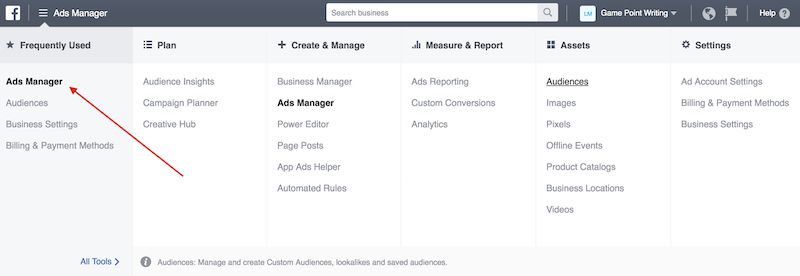
Facebook Ads Manager.
Next, click Audiences:
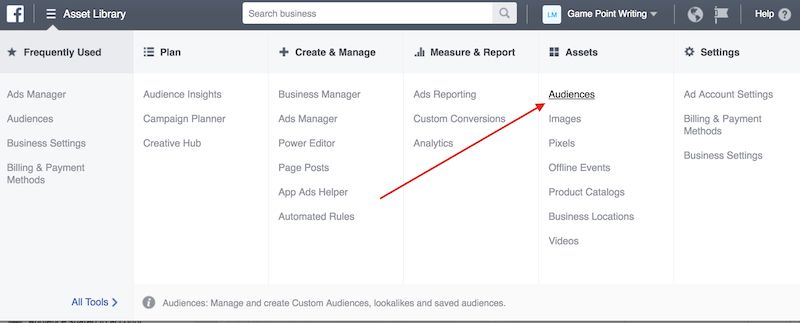
Audience tab of Facebook Ads Manager.
Then select Create Audience > Custom Audience:

Facebook Ads Manager How to create lookalike Audiences.
Select Website Traffic and then enter the URL of your Tofu content:
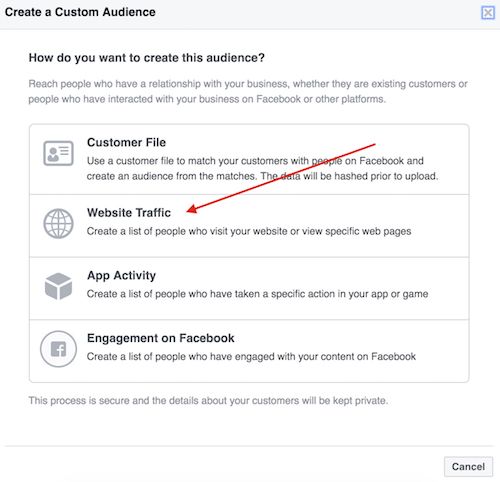
FB Ads Manager: Use website traffic.
Name your audience, add notes, adjust as necessary, and then click Create Audience:
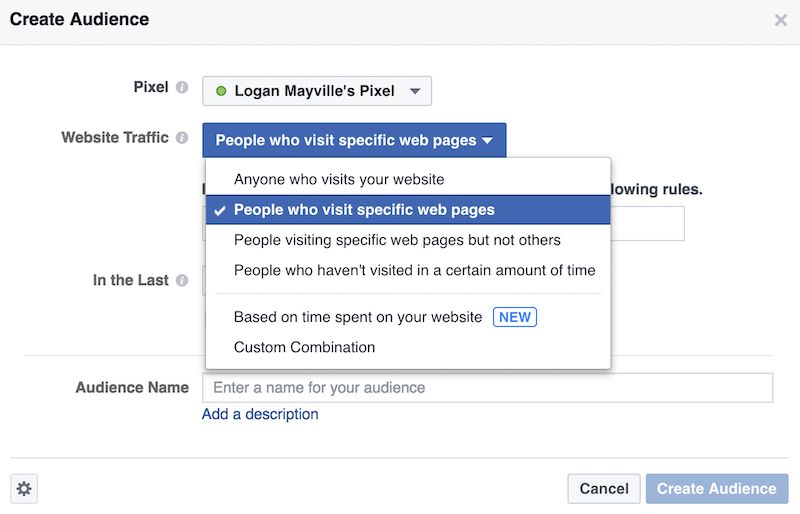
Ads Manager enter blog post URL.
Now, anybody who visits that blog post (regardless if they came in from a Facebook ad or not) will be tracked by Facebook. Cool.
Next, send some traffic to that blog post!
- Create an ad
- Choose “Traffic” as your objective
- Fill out your audience targeting, budget, schedule, etc.
- Plug in your ad creative
- Launch the ad
What you’re looking for at this point is to get the cheapest clicks possible. This will come down to a few more complex factors:
- Making the ad compelling (related to how compelling the Tofu content is but the ad itself still needs to be good)
- Targeting the right audience (bigger scope than we have time for, so check out this guide to ad targeting)
- Other unique factors specifically related to your niche
OK, so we’re generating quality traffic efficiently—but where is the money and/or leads?!
Keep reading…
Step 2. Retarget Tofu Visitors With an Offer
If the Tofu asset you sent the traffic to is any good, you’ll have accomplished the following with your target consumers:
- Introduced your brand
- Provided value for free
- Built trust
- Convert a few into email subscribers
- Dropped a cookie into their browsers
You let them read your content and walk away without shoving a sales message at them. Now it’s time to bring them back to you.
Create a new Facebook ad campaign, but this time, instead of using “Traffic” as the Objective, use “Conversions.”
When setting up your audience targeting, instead of using demographic/psychographic data like you did last time, just click Custom Audiences and choose the one you set up earlier. Remember? It’s the one recording people who visit your blog post.
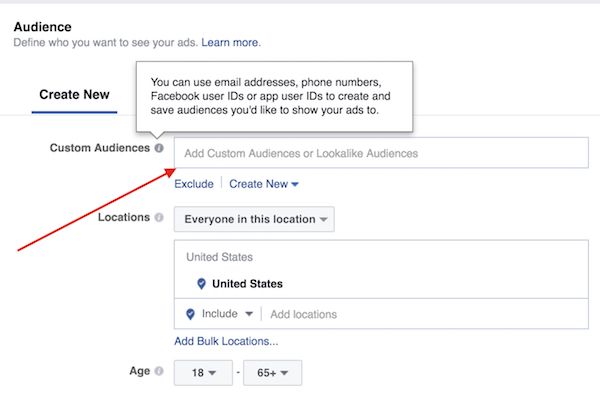
Create a new Facebook ad campaign, but this time, instead of using “Traffic” as the Objective, use “Conversions.”
Now, instead of sending these retargeted users to another blog post, send them to a piece of conversion-oriented content. For advanced marketers, this will likely be a lead magnet, which trades premium content for an email address. From there, they’ll attempt to close the lead or create the sale through email nurturing programs.
If you don’t have a lead magnet and the corresponding email automation system in place, this is the time to use your ecommerce, sales or landing page.
Just make sure that the conversion-oriented asset you send the retargeted traffic to is related to the original ToFu asset! That’s what got them to click in the first place, so stay on topic.
Facebook Ads Guide: Facebook Conversions
Lastly, make sure that you’re using the proper Facebook Standard Events on the conversion page. Standard Events are little extra bits of code that help your website communicate with the Facebook Ads Manager reporting interface.
This is hugely important for the ability to accurately record conversions.
More about Standard Events here.
If you implement your Standard Events properly, you can do a lot of really cool things.
For example, your website can dynamically pass revenue data to Facebook so that you can have your ROI calculations done for you automatically! Pretty nifty for ecommerce stores with a variety of products and price points.
Optionally, if you don’t want to use Standard Events, you can use Custom Conversions to record conversions.
Basically, you tell Facebook that if somebody loads a certain URL (like store.com/umbrella/thank-you) to record a conversion. You’ll miss out on some of the more advanced features, but it’s a good place to start if you don’t have access to the technical skills required to implement Standard Events.
Facebook Ads Guide Bonus Round: Create Lookalike Audiences
You want to hear something embarrassing about me?
I’ve spent countless hours on cold targeting and retargeting strategies for various clients. I like to think I’m kinda good at it.
But roughly 75% of the time, when I let Facebook do the targeting for me, its campaigns out-perform mine!
You might be wondering what I mean by “let Facebook do the targeting for me.”
I’m referring to Lookalike audiences, which are a vastly underutilized tool of the Facebook ads platform.
The purpose of a Lookalike audience is to use a given parameter and let Facebook use the data in its Open Graph to find people who are just like that parameter.
For example, you can ask Facebook to send your ads to people who are similar to your Facebook Page’s audience, an email list you have, or better yet, people who have already bought from you.
Seriously, does it get any better than that? “Hey Facebook—here are a bunch of people who bought my widgets or became leads. Can you send my ads to people who are similar to them?”
To set up a Lookalike audience for people who have bought or converted from you, follow these steps:
- Click Create Lookalike audience
- Select audience (You’ll need to create a “customer” custom audience first)
- Create the audience
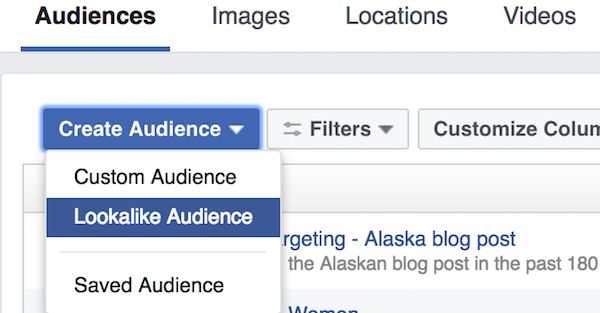
To set up a Lookalike audience for people who have bought or converted from you, follow these steps.
Now that you’ve created the audience, choose to target it when you create your next ad campaign (instead of cold targeting or retargeting).
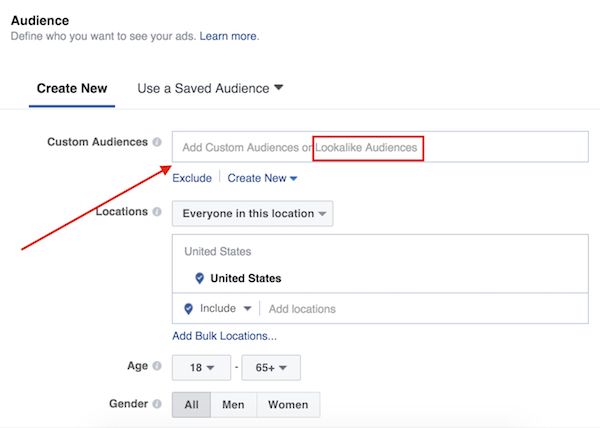
Choose Lookalike Audience.
Test the Lookalike campaign against your other campaigns and see which performs better.
You’ll never actually know exactly what is similar about your conversions and your Lookalike audiences — Facebook keeps that data semi-private. This isn’t ideal, but hey—if you’re getting conversions and making money, it could be worse.
Conclusion: Tofu Is Your Friend
Facebook doesn’t need to be complicated. You can get some truly incredible results with simple Tofu campaigns.
If you follow these steps, you will create a Facebook ad campaign that uses customer experience and natural buyer behavior to drive conversions.
So stop wasting your money on the “Boost Post” button, and start getting real ROI via Facebook ads. Now, check out these inspiring examples of persuasive copy in online advertising.


Trackbacks & Pingbacks
[…] For a step-by-step guide covering the first 2 parts, check out this guide from Neil Patel. For a how-to guide to setting up retargeting, follow this guide from Conversion Sciences. […]
[…] For a step-by-step guide covering the first 2 parts, check out this guide from Neil Patel. For a how-to guide to setting up retargeting, follow this guide from Conversion Sciences. […]
[…] For a step-by-step guide covering the first 2 parts, check out this guide from Neil Patel. For a how-to guide to setting up retargeting, follow this guide from Conversion Sciences. […]
[…] For a step-by-step guide covering the first 2 parts, check out this guide from Neil Patel. For a how-to guide to setting up retargeting, follow this guide from Conversion Sciences. […]
Comments are closed.